
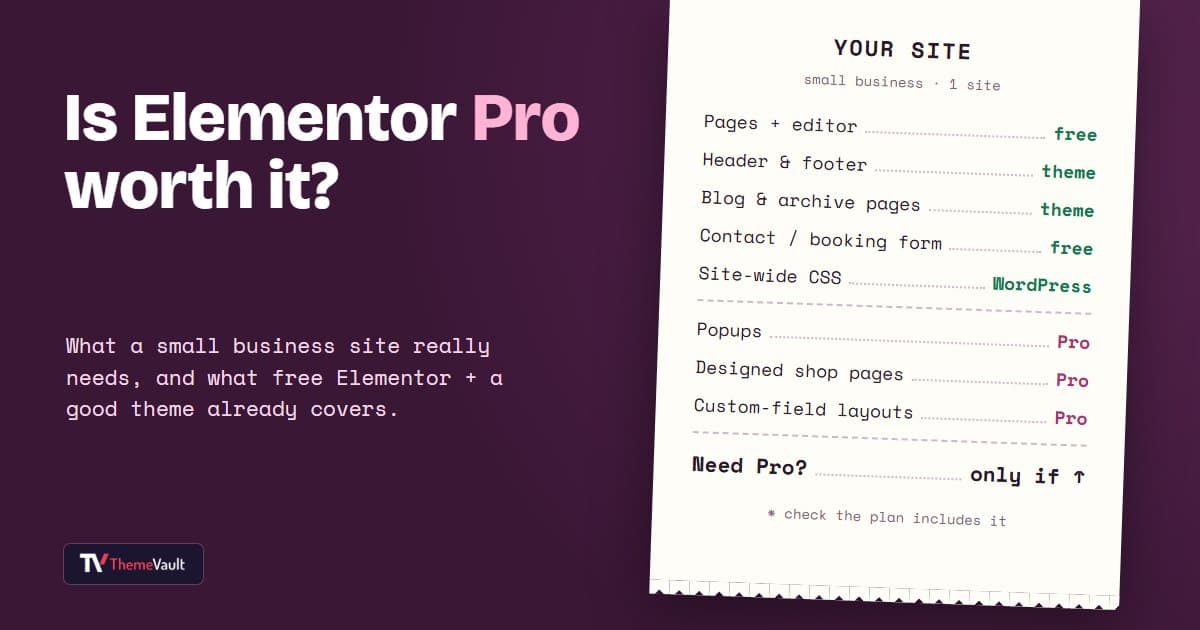
If you build WordPress sites with Elementor, the upgrade prompts start almost immediately. A locked widget here, a greyed-out option there, a little line at the bottom of the panel saying “Access all Pro widgets. Upgrade Now”. It’s easy to assume the free version is a demo and Pro is where the real product lives.
For a lot of small business sites, that isn’t true, and I have a slightly unusual reason to know. We build Elementor themes for restaurants, gyms, salons and agencies, and we made a rule from the start: they must work on free Elementor, with nothing from Pro. Building them meant working right on the line between free and Pro, finding out what you really can’t do without it and what only looks locked. This post is the honest version: what Pro adds, what it costs, when it’s worth every rupee or dollar, and when you’d be paying every year for features your site never uses.
The short answer
Elementor Pro is worth it if you design many sites from scratch, run a WooCommerce shop whose product pages you want to design, need marketing popups, or pull content from custom fields into your layouts. It’s usually not worth it for a single small business site whose theme already handles the header, footer, blog pages and forms. In that case free Elementor plus a good theme covers what the business actually needs, and the money is better spent on photos or a few hours of copywriting.
The rest of this post explains how to tell which side of that line your site is on.
What free Elementor already does well
Free Elementor isn’t a trial. On WordPress.org it’s the plugin called “Elementor Agent Ready Website Builder”, with more than 10 million active installs, version 4.4.1 at the time of writing, updated the day before I checked. From the start you get the drag-and-drop editor, the core widgets (headings, text, images, buttons, icons, video, galleries, tabs, accordions and so on), separate settings for desktop, tablet and phone, and site-wide global colours and fonts.
When I tested Elementor’s own website-kit importer on free Elementor for our template kit guide, content and site settings (global colours, global fonts, theme style) imported without a licence. Only one block was greyed out with an “Upgrade” button, and it’s a revealing one:
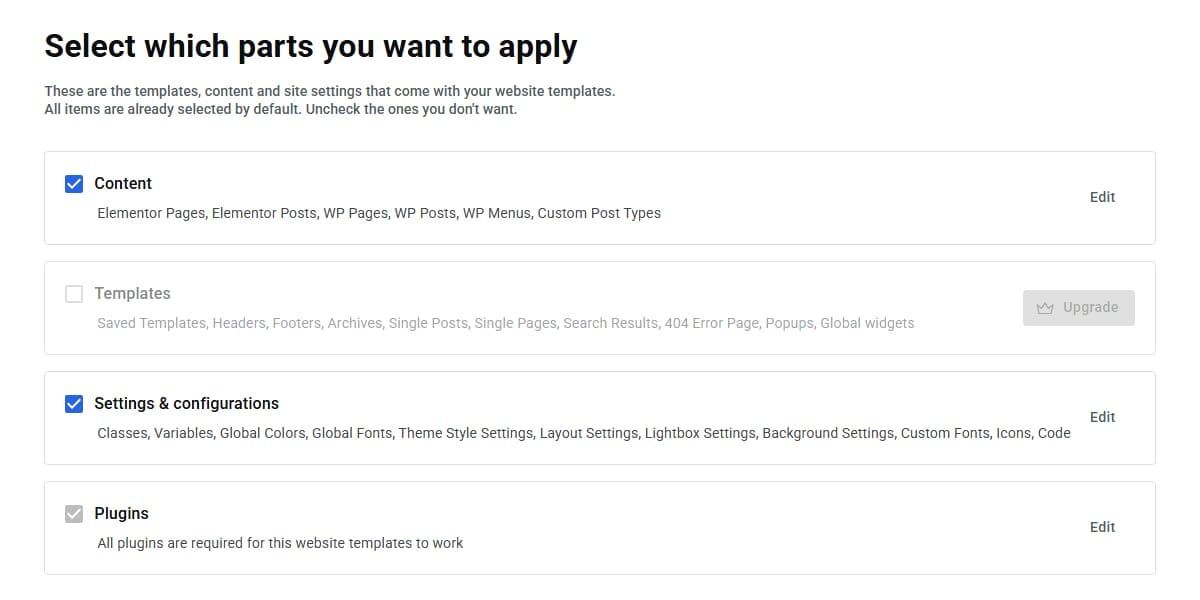
That greyed-out list is the heart of the free-versus-Pro question: saved templates, headers, footers, archives, single posts, single pages, search results, the 404 page and popups. In other words, Pro is mostly about building the parts of the site that sit around your pages.
What Elementor Pro adds
Going by Elementor’s own Pro and pricing pages (read on 17 November 2026), these are the main things you pay for:
- Theme Builder: design your header, footer, blog post layout, archive pages, search results and 404 page in Elementor, instead of relying on the theme.
- Form Builder: a form widget with fields, validation and actions after sending.
- Popup Builder: popups for offers, newsletter sign-ups or announcements, with rules for when they appear.
- Dynamic Content: fill widgets from post data and, on the higher plans, from custom fields and custom post types.
- WooCommerce Builder: design product, cart, checkout and account pages, with more than 20 shop widgets.
- Loop Grid and Loop Carousel: design one card and repeat it for a list of posts or products.
- Custom code and CSS, Motion Effects, and a library of cloud templates.
Those are real, useful features. The question is only whether your site needs them.
What it costs, plan by plan
Elementor’s pricing page describes Pro as “starting from $60/year”. The exact figures are loaded on the page as you view it and change with promotions, so check them there rather than trusting any blog (including this one) for the current number. Third-party sites I looked at disagree with each other by a few dollars on most plans.
What matters more than the headline price is what each plan includes. The cheapest plan, Essential, covers one site and includes the Theme Builder and the Form Builder, but Elementor lists its forms as “form submissions not included”, and Essential doesn’t include the Popup Builder, custom code and CSS, or the WooCommerce features. To get those you need Advanced Solo (one site) or a higher plan: Advanced covers three sites and Expert covers 25. Plans are yearly, “renews at regular rate”, and the 30-day money-back guarantee applies to annual plans only.
It also helps to think in years rather than months. At the starting price Elementor quotes, three years of the cheapest plan is $180, before any price change, and you need the plan that includes your feature, which may not be the cheapest. That isn’t a lot for a business that uses Pro every week. It’s a lot for a site that was finished in its first month and hasn’t needed a new popup since.
So the realistic question for a business is rarely “is $60 a year worth it?”. It’s whether the specific feature you want is in the plan you’re about to buy, and whether you’ll still want to pay for it in year three.
What about Elementor’s ready-made website kits?
A lot of people discover Pro through Elementor’s own library of complete website kits: pick a design, import it, change the text. It’s worth knowing how much of that library is free before you plan around it. When I browsed it for our kit guide, the library had 58 website kits. Six were free, nine needed the Essential plan, and the other 43 needed “Advanced & Higher”. So 52 of the 58 needed a paid plan, most of them one above the cheapest.
And even a free kit, imported on free Elementor, brings in its pages and site settings but not its header and footer templates, because those sit in the Pro-only part of the importer shown above. The kit’s pages arrive; the frame around them still comes from your theme. That’s not a criticism of the kits, just something to know before you choose one for a client who isn’t going to buy Pro.
If you buy a kit elsewhere (Envato and others sell them), check which Elementor widgets it was built with. Sections built with Pro widgets won’t work on free Elementor, so read the seller’s requirements before you buy; a good listing says plainly whether Pro is needed.
The four things small businesses usually want Pro for
When someone running a restaurant, salon, gym or small agency says “I think I need Elementor Pro”, it nearly always comes down to one of four things. Each has a free answer, so check those first.
1. “I want a proper header and footer”
On free Elementor, the header and footer come from your theme. With a bare-bones starter theme they’re plain, which is where the urge to upgrade comes from. But a theme designed for your kind of business already has a finished header (logo, menu, a “Book a table” button) and footer (address, hours, social links), editable in Appearance → Customize. You only need Pro’s Theme Builder if you want to design the header yourself, in Elementor, differently from what the theme offers.
2. “I need a contact or booking form”
Free Elementor has no form widget, and this is the most common reason people upgrade. The alternatives are well proven: Contact Form 7 (more than 10 million active installs), WPForms Lite (more than 5 million) and Fluent Forms (more than 800,000) are all free on WordPress.org and were updated in the last few weeks. Many business themes also ship their own form. Remember too that Pro’s cheapest plan lists its forms as “form submissions not included”, so if keeping a record of every enquiry inside WordPress matters to you, check which plan does that before you buy.
3. “My blog pages look plain”
Free Elementor builds pages, not the templates WordPress uses for blog posts, categories, search results and the 404 page. Those come from the theme. If your theme’s blog looks good, you don’t need the Theme Builder. If it doesn’t, choosing a better-designed theme is usually cheaper than redesigning every template yourself.
4. “I want to change a bit of CSS”
Per-element custom CSS is a Pro feature (and not in Essential). For small tweaks, WordPress itself has a place for CSS in classic themes: Appearance → Customize → Additional CSS. It applies site-wide, which is usually what you want for a colour or spacing fix anyway.
When Elementor Pro is worth it
I don’t want this to read as “never buy Pro”, because for some people it pays for itself quickly:
- Freelancers and agencies who design a different site for every client. Theme Builder, saved templates and Loop Grid save hours per project, and the 25-site Expert plan spreads the cost across many clients.
- WooCommerce shops that want product, cart and checkout pages designed rather than left to the theme’s defaults.
- Sites that run on data, such as listings, events or properties stored in custom fields and custom post types, where Dynamic Content and Loop Grid turn one designed card into hundreds of pages.
- Marketing-led sites that live on popups, timed offers and sign-up forms, where the Popup Builder and Form Builder are used every week.
If one of those sounds like you, buy it, and buy the plan that actually includes the feature you need.
How our Elementor themes avoid needing Pro
Here’s the approach we took, using Bistrofeast Elementor as the example, because it shows what “free Elementor is enough” looks like in practice. Every section of the design (the hero with tonight’s specials, the menu, the chefs, the reviews, the booking panel) is its own Elementor widget, 23 in all, each with its content, show-and-hide switches, alternative layouts and a Style tab. You drag them onto any page and edit them like any other widget. And it’s all running on free Elementor; that “Upgrade Now” line is still sitting at the bottom of the panel:
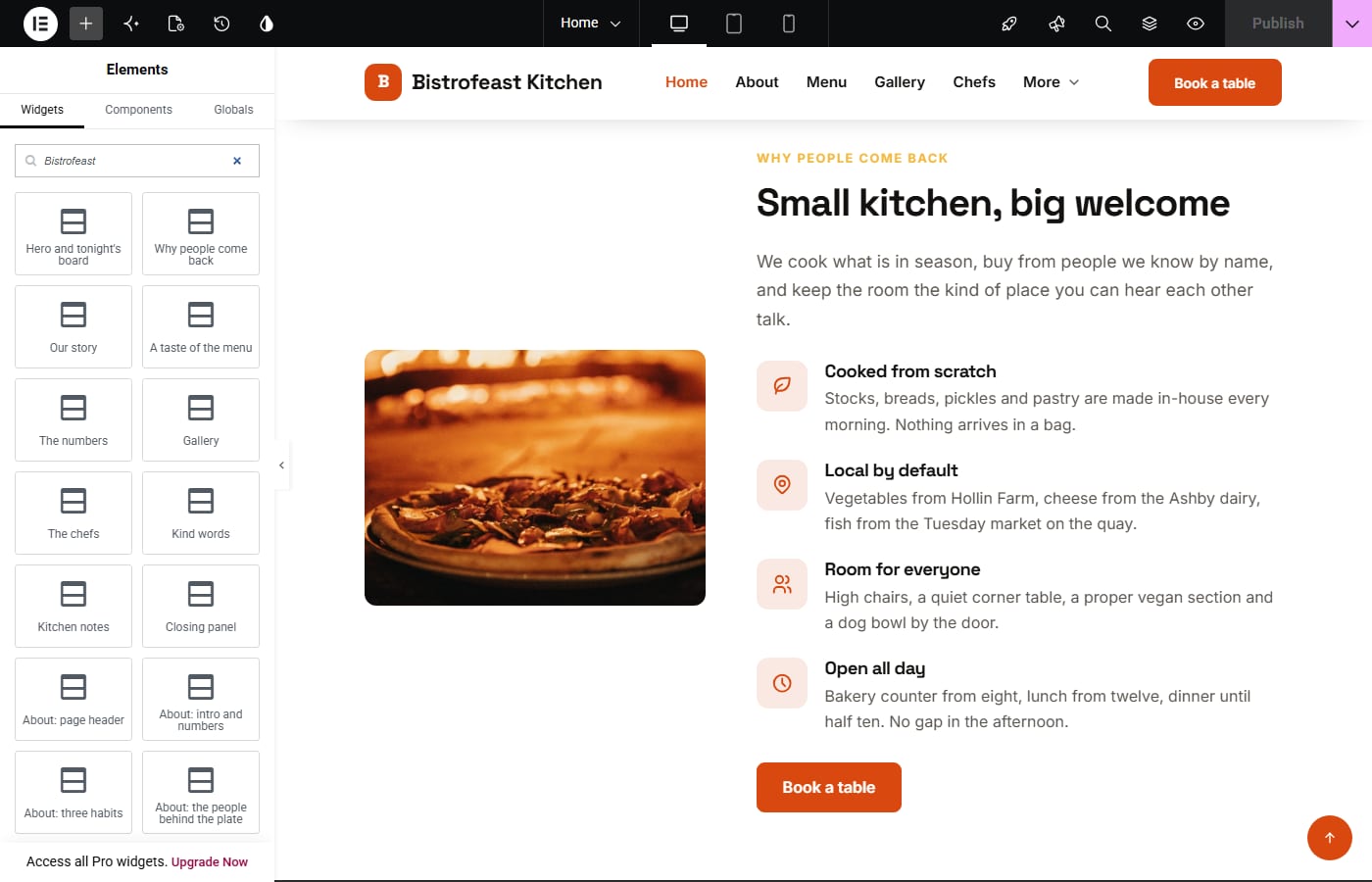
The four things from the list above are handled without Pro:
- The header and footer are the theme’s, finished and edited in the Customizer.
- The table booking form is our own widget. Each booking is saved in wp-admin by the companion plugin and emailed, so nothing is lost if an email goes astray.
- The blog, archive, search and 404 pages are proper theme templates in the same design.
- The menu, chefs, gallery and reviews live in wp-admin as their own sections, so the widgets read them instead of you retyping them on every page.
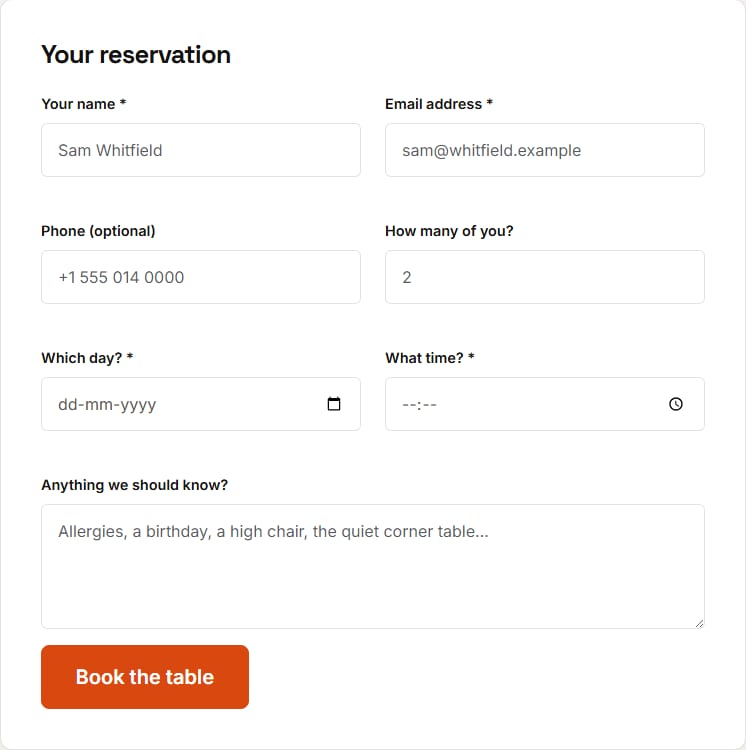
FoodFries, Huebold, Pulsiron and Beautilicious follow the same rule: free Elementor only, with the header, footer, blog pages and forms coming from the theme. (Their forms email each enquiry; Bistrofeast also keeps every booking in wp-admin.) All five are $19 each, once, which is a different kind of cost from a yearly licence. One thing in Pro’s favour: our themes give you our designs to edit, not a blank canvas to design anything you can imagine; if you want the canvas, that’s exactly what the Theme Builder is for.
What about free add-on packs?
There’s a whole category of free plugins that add widgets to Elementor. The two biggest on WordPress.org are Essential Addons (more than a million active installs) and Royal Addons (more than 600,000), and both add a long list of extra widgets, some of which cover ground that Elementor keeps for Pro.
They’re useful, with one caution: every add-on pack loads its own code, and it’s easy to install three of them for one widget each. Pick one, use what you need, and switch off the widgets you don’t use in its settings, so your pages stay fast.
Try it before you pay
The cheapest way to answer this question is to build your real site on free Elementor first and see where you get stuck. On a staging copy of your site, or a local WordPress on your own computer, install Elementor from Plugins → Add New, install the theme you plan to use, and build the home page and contact page you actually need, with your own text and photos.
Keep a note of every moment Elementor asks you to upgrade, and what you were trying to do at that moment. After an hour you’ll have a short, honest list. Sometimes it’s empty. Sometimes it’s one item that a free plugin solves. And sometimes it’s five items that all point to the Theme Builder, which is a clear sign Pro will earn its keep.
If you do buy and then realise you don’t need it, remember the refund rule: Elementor’s 30-day money-back guarantee applies to annual plans only, so don’t pick the monthly option just to try it out.
A simple way to decide
Before you upgrade, write down the exact thing you want to do that free Elementor won’t let you do. Then ask three questions:
- Does my theme already do it? (Header, footer, blog pages and a form are often already there.)
- Is there a well-maintained free plugin for it? (Forms almost always; check the install count and last update on WordPress.org.)
- If I really need Pro, which plan includes this feature? (Popups, form submissions and custom code aren’t in the cheapest plan.)
If you get to the third question with a clear answer, Pro is probably worth it for you. If you stopped at the first or second, you’ve just saved yourself a yearly bill.
If you’re still deciding on the platform itself, I compared WordPress with a custom-built site in Next.js vs WordPress, and all our designs that run on free Elementor are in the Elementor themes collection.
Frequently asked questions
Is Elementor free enough for a business website?
Often, yes. Free Elementor builds the pages; a good theme supplies the header, footer, blog templates and often a form. Pro becomes worth it when you want to design those surrounding parts yourself, sell with WooCommerce, or use popups and dynamic content.
Can I start with free Elementor and upgrade later?
Yes. Pro is an add-on that runs alongside the free plugin, so pages you build on free Elementor stay as they are when you add Pro later.
Does the cheapest Elementor Pro plan include forms?
It includes the Form Builder, but Elementor lists its forms as “form submissions not included”. If you want submissions handled by Pro, compare the plans before buying, or use a free form plugin.
Do I need Elementor Pro for WooCommerce?
No. WooCommerce works with free Elementor and your theme’s shop pages. Pro adds the WooCommerce Builder, which lets you design those product, cart and checkout pages yourself.
Do your Elementor themes need Elementor Pro?
No. Every ThemeVault Elementor theme is built and tested on free Elementor, with the header, footer, blog pages and forms handled by the theme.
More from the blog
College Website Project in HTML with Source Code (Free Template, Step by Step)
We turned our free Educatunify template into a college website step by step: the pages you need, the edits, the forms, GitHub Pages, the report and viva questions.
Read article →
How to Deploy an Astro Site: Cloudflare, Netlify, Vercel and GitHub Pages (Tested)
One Astro template, three hosts, real timings: how to deploy a static Astro site, and the 404, canonical and login-wall surprises nobody warns you about.
Read article →
Restaurant Menu Plugins for WordPress: Which One You Need (and When You Don't)
Menu plugin, ordering plugin or a theme with the menu built in? We compared the main WordPress options on installs, ratings, updates and what's really free.
Read article →