
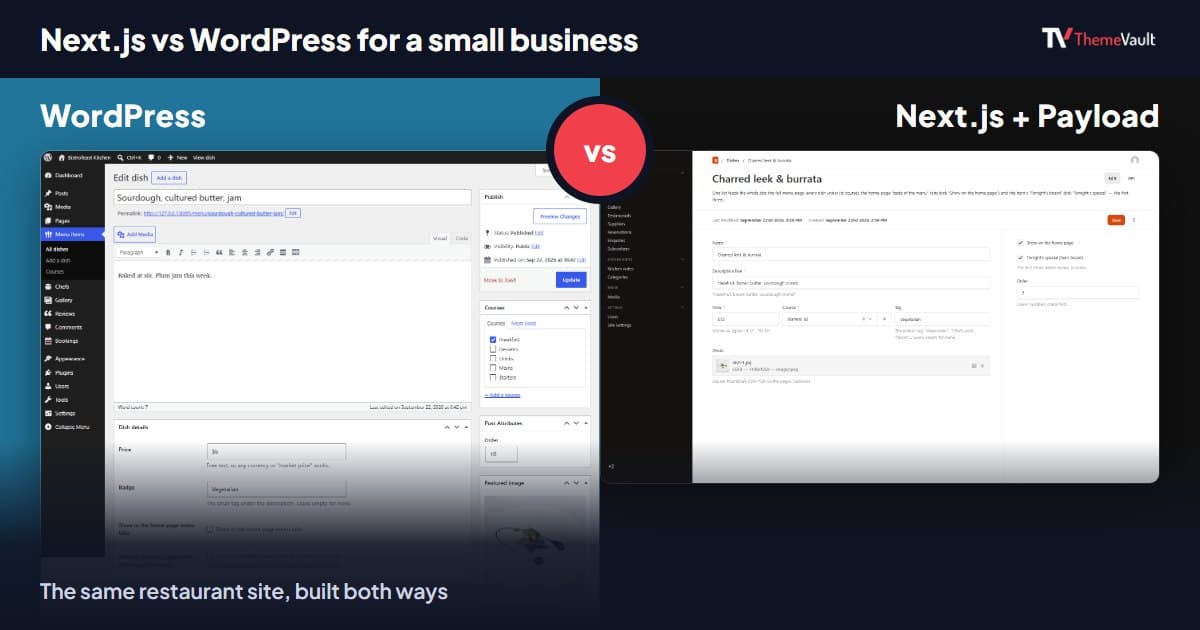
If you run a small business and someone has told you to “just use Next.js”, while someone else swears WordPress is the only sensible choice, you’re not getting bad advice from either of them. You’re getting advice from two different kinds of people. WordPress is what most site owners pick so they can run the site themselves. Next.js is what developers pick so they can build exactly what they want. The right answer for you depends far more on who will look after the site in a year than on which one is “faster” or “better for SEO”.
I can write about this with some confidence because we recently built the same restaurant website twice: once as a WordPress theme and once as a Next.js template with its own admin panel. Same design, same pages, same reservation form, same content. Doing that side by side showed me where the two really differ, and it’s rarely where the online arguments say it is.
The short answer
Choose WordPress if you (or someone non-technical on your team) will update the site, you want cheap and familiar hosting, and you’d like the option of adding a booking plugin, a shop or an SEO plugin later without hiring anyone.
Choose Next.js if a developer will own the site, you want the content model and features shaped exactly to your business, and you’re comfortable paying for a Node.js host or a small server and running updates with a command line.
If you’re somewhere in between, keep reading. Most of the decision comes down to four things: who edits, where it’s hosted, who keeps it updated, and what you’ll want to add in two years.
What each one actually is
This sounds basic, but half the confusion comes from comparing two different kinds of thing. WordPress is a complete content management system. You install it on a PHP host, and it gives you an admin area, users, pages, posts, a media library, menus, and a plugin and theme system. A theme decides how it looks; plugins add features. According to W3Techs, WordPress runs 39.5% of all websites and 58.2% of the sites whose CMS they can identify (figures dated 30 October 2026). That size is its biggest strength: there’s a plugin, a tutorial and a freelancer for nearly everything.
Next.js is a framework for building websites and web apps with React. Out of the box it has no admin area, no user accounts and no place for a shop owner to change the opening hours. A developer builds the site in code, and if non-developers need to edit content, it gets connected to a CMS. That can be a hosted service, or, as in our templates, Payload CMS running inside the same app at /admin.
So the real comparison isn’t “WordPress vs Next.js”. It’s “WordPress with a theme” against “Next.js with a CMS someone has set up for you”. Once you compare those, the trade-offs become much clearer.
What building the same site twice taught me
Bistrofeast is a restaurant and café design: a home page with “Tonight’s board” under the hero, a full menu with a tab for each course, gallery, chefs, guest reviews, a blog the design calls “Kitchen notes”, a contact form and a table reservation form. We gave both versions the same rule: everything a restaurant changes over time must be editable without touching code, and the reservation form must work on day one.
The Bistrofeast WordPress theme does it with WordPress’s own tools. Dishes, chefs, gallery photos, reviews and bookings each get their own section in the left-hand menu of wp-admin. Every other line of text on the site, from the hero headline to the footer, lives in Appearance → Customize, with a live preview. It needs WordPress 6.4 or newer and PHP 8.0, and no plugins at all: the reservation and contact forms are built in, bookings are stored under Bookings with a status you can set (New, Confirmed, Seated, Cancelled), and the guest gets a confirmation email.
The Bistrofeast Next.js template runs on Next.js 16 with Payload CMS 3 inside the same app. The admin panel lives at /admin, with Dishes, Courses, Team, Gallery, Testimonials, Suppliers, Reservations, Enquiries and Subscribers on the left, and a Site Settings screen that holds the header, the home page sections, the About page and the footer. Out of the box it stores everything in a single SQLite file, so there’s no separate database server to set up.
Here is the same job, editing one dish, in each:
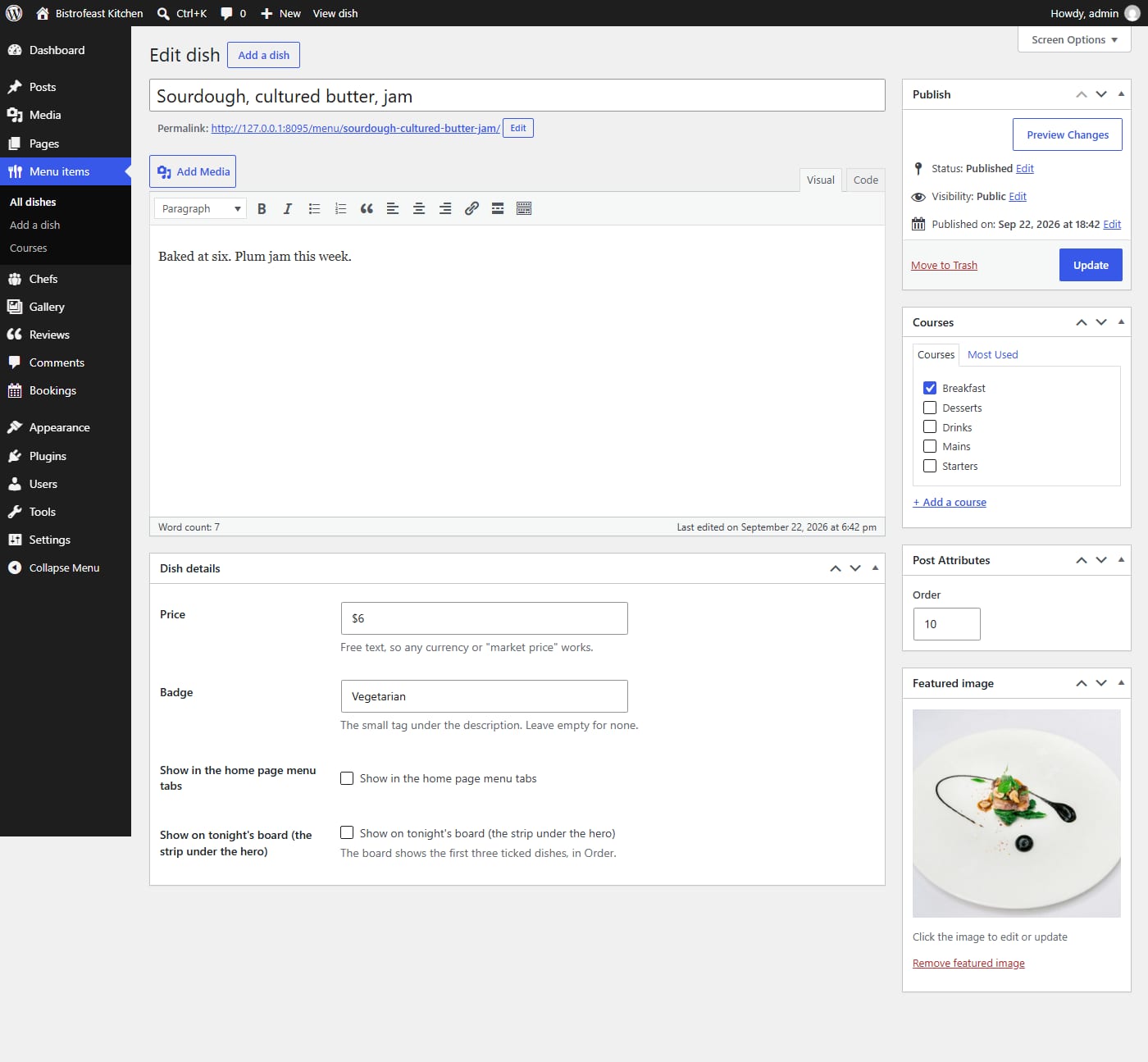
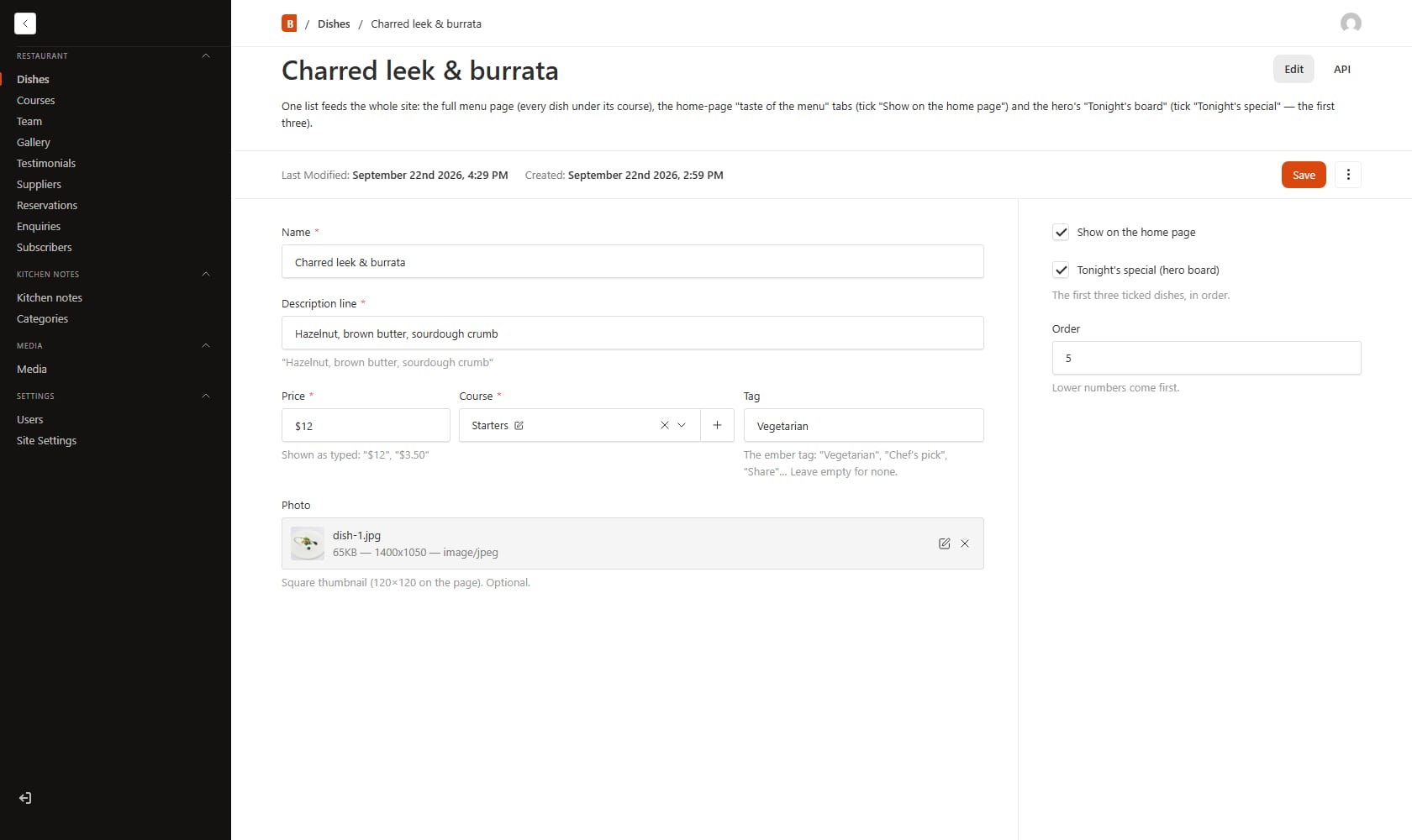
Both work, and a restaurant manager could use either after five minutes. The difference is in what surrounds that screen. In WordPress, the dish sits next to Posts, Pages, Comments, Plugins, Tools and Settings, things a restaurant doesn’t need but which are familiar to the millions of people who have used WordPress before. In the Payload admin, there’s nothing on screen that isn’t about the restaurant. It looks cleaner, but it’s also an admin nobody on your team has seen before.
One more thing I noticed: the WordPress version had to work inside rules we didn’t write. Where each piece of text lives (the Customizer for fixed text, post types for lists, the Reading settings for the home page) follows WordPress conventions, and the setup guide has to walk you through creating pages and choosing their templates. In the Next.js version we decided all of that ourselves, so there’s less setup. You install it, run the seed command, and every page exists. That freedom is the whole point of Next.js, and it’s also why it needs a developer: someone has to make every one of those decisions.
The first hour with each
Setup is where the difference in audience shows most clearly, so here’s what the first hour actually looks like with each version, taken from the guides that ship with them.
With the WordPress theme, you log in to wp-admin, go to Appearance → Themes → Add New → Upload Theme, choose the zip and press Activate. Then you set permalinks to “Post name” so the Menu, Gallery and Chefs pages have clean addresses, create the Home, About, Book a table, Contact and Thank-you pages and pick each one’s template from a drop-down, tell WordPress which page is the home page, build the menu, and upload your logo. Everything is a click in a screen most web people have seen before. The forms start working the moment the theme is active. If you can follow a recipe, you can do this.
With the Next.js template, the first steps happen in a terminal: npm install, copy the example environment file and put a long random secret in it, then npm run seed, which loads the demo content and creates your first admin user, and npm run dev to see it at localhost:3000. You log in at /admin and change the default password straight away. Putting it online means npm run build and npm start on your server, keeping the process alive with PM2 or a system service, and pointing nginx or Caddy at it. For a developer this is a routine twenty minutes. For a restaurant owner it’s a wall.
After that first hour, the day-to-day work is surprisingly similar. You log in, open Dishes or Menu items, change a price, save. The difference is who you call when something goes wrong.
Who will edit the site?
This is the question that decides it for most small businesses, so I’ll be blunt. If the person who’ll be adding this week’s specials, changing opening hours and posting news isn’t a developer, WordPress is the safer choice. Not because the Next.js admin is harder (ours isn’t), but because WordPress skills are everywhere. Your next employee may already know it. A local freelancer can help for an hour. Every question has been asked and answered online many times.
With Next.js, editing day-to-day content is fine once a CMS is set up. What a non-developer can’t do is anything outside it: add a new page type, add a field, install a feature. Those are code changes. In WordPress, a lot of that is a plugin and a settings screen, for better or worse.
If a developer or agency will look after the site anyway, the picture flips. A developer usually prefers changing code they understand to fighting a plugin’s settings, and a content model built for your business, like the Dishes and Reservations above, is easier to reason about than custom fields added by three different plugins.
Hosting and what it costs to run
WordPress runs on almost any PHP web host, including the cheapest shared hosting plans, and many hosts install it with one click. That’s a real advantage for a small business: hosting is cheap, easy to find, and your host’s support team has seen WordPress problems before.
A Next.js site with a built-in CMS needs a host that can keep a Node.js process running. Ordinary shared PHP hosting won’t do. Our Next.js templates recommend a small virtual server (VPS) or any Node.js host: you install, build, and start the app, keep it running with PM2 or a system service, and put nginx or Caddy in front of it. The SQLite database file and the uploaded images sit next to the app, so both go in your backups.
What about Vercel, the company behind Next.js? Its free Hobby plan is only for personal, non-commercial use, according to Vercel’s own documentation, so a business site needs a paid plan. There’s also a technical catch for templates like ours: serverless platforms have a read-only file system, so the SQLite database and local image uploads won’t work there. The template’s README covers the switch: Payload’s Postgres adapter for the database and a storage plugin for uploads. It’s a short change for a developer, but it’s one more service (and often one more bill).
I won’t pretend there’s a single price for either, because hosting prices vary hugely by country and provider. The honest summary: WordPress can run on the cheapest hosting there is; Next.js with a CMS needs at least a small server or a paid platform plan.
Updates and security
This is where WordPress’s popularity cuts both ways. Patchstack’s report on WordPress security in 2026 counted 11,334 new vulnerabilities in the WordPress ecosystem in 2025, 42% more than the year before. 91% of them were in plugins and 9% in themes. Only six were reported in WordPress core itself, all low priority. The report also notes how fast attackers move: for the vulnerabilities that were exploited heavily, the median time to mass exploitation was five hours.
The lesson isn’t “WordPress is unsafe”. It’s that most WordPress risk comes from what you add to it. Every plugin is someone else’s code that has to be kept up to date. That’s why we built the Bistrofeast WordPress theme to need no plugins at all, with the forms and bookings built in. Fewer moving parts is the best security advice I know for a small WordPress site. Turn on automatic updates for core, keep plugins to the ones you really use, and delete the ones you don’t.
Next.js isn’t exempt. Any framework has security fixes (in March 2025, for example, Next.js patched a flaw known as CVE-2025-29927 that could let requests skip middleware checks). The difference is how updates reach you. WordPress can update itself from the admin. A Next.js site is updated by a developer: update the packages, rebuild, test, deploy. If no developer is around, a Next.js site quietly stops getting updates, and that’s the risk to plan for.
SEO and speed
Search for “Next.js vs WordPress for SEO” and you’ll find strong opinions in both directions. Here’s what I believe after building both: either can rank well, and neither will rank a thin site. Google cares about whether the page answers the search, loads quickly, works on a phone and can be crawled. Both of our Bistrofeast versions send complete HTML to the browser, so search engines see the full page without running scripts.
Speed depends far more on what’s on the page than on the platform. A WordPress site with a lean theme, sensible images and good caching is fast. A WordPress site with a heavy page builder and twenty plugins usually isn’t, and that’s where Next.js’s reputation for speed comes from. Next.js gives a developer fine control over what loads and when, and it’s easy to make very fast pages with it. It’s also possible to build a slow one.
For SEO tools, WordPress has the advantage for non-developers: plugins like Yoast or Rank Math give you titles, descriptions and sitemaps from a settings screen. In Next.js, the developer builds those in (our template’s Site Settings includes an SEO section), and changing how they work is a code change.
Growing the site later
Think about what you might want in two years. An online shop? WordPress has WooCommerce, which is huge, and a great many booking, membership and course plugins. You can often add a big feature in an afternoon, then live with the plugin’s choices.
With Next.js, any new feature is built or connected by a developer: a shop through a commerce service, bookings through an API, members through an auth library. It takes longer and costs more at first, but the result fits your business exactly, and it doesn’t drag twenty unrelated settings screens along with it. For anything that’s more app than website (a customer portal, a dashboard, an ordering system with rules of its own), Next.js is the more natural home.
Moving later is possible both ways, but it’s a rebuild, not a switch. Content can be exported and imported; the design and features have to be rebuilt. So it’s worth choosing for the next few years, not just the launch.
A quick way to decide
Answer these honestly:
- Will someone who isn’t a developer change things on the site every week? If yes, lean WordPress.
- Do you have a developer or agency who’ll still be around in a year? If no, lean WordPress.
- Do you need features no plugin does well, or something closer to an app? If yes, lean Next.js.
- Is cheap, everyday PHP hosting important to you? If yes, lean WordPress.
- Does your developer want the content model in code, in git, reviewed like the rest of the project? If yes, lean Next.js.
If your answers split, look at the middle options. An Elementor theme is still WordPress, but you edit pages by dragging blocks instead of filling in fields, and our Elementor WordPress themes work with the free version of Elementor. And if the site rarely changes, a static site (our Astro templates) or plain HTML may be all you need, with the cheapest hosting of all.
Where our templates fit
We sell several designs in more than one format for exactly this reason: the design shouldn’t decide your platform. Bistrofeast and FoodFries are restaurant designs available as WordPress, Elementor, Next.js and Astro versions. Pulsiron (gym and fitness) and Huebold (creative agency) come in all four too. Each WordPress version is $19 and each Next.js version is $29, and the Pro plan includes every format of every design along with the right to remove the footer credit.
Browse our WordPress themes if you want the familiar route, or our Next.js templates if a developer will own the site. Every one of them ships with a setup guide written for that format. If you’d like to see what’s included before you choose, the Pro plan page lists it.
FAQ
Is Next.js better than WordPress for SEO?
Not by itself. Both can produce fast, crawlable pages with full HTML. Rankings come from the content, the page speed and how well the site is built, and a well-made WordPress site will outrank a thin Next.js one. Next.js gives a developer more control over performance; WordPress gives a non-developer easier SEO settings through plugins.
Is Next.js faster than WordPress?
It can be, because a developer controls exactly what loads. But a lean WordPress theme with good caching is fast too, and a badly built Next.js site can be slow. Heavy page builders and long plugin lists are what usually make WordPress sites slow.
Can a non-developer edit a Next.js website?
Yes, if it’s connected to a CMS. Our Next.js templates include Payload CMS at /admin, where you edit dishes, team, gallery, settings and so on in forms. What a non-developer can’t do is add new types of content or new features; that needs code.
Can I host a Next.js site on shared hosting?
Usually not. Next.js with a built-in CMS needs a host that runs a Node.js process. A small VPS or a Node.js-capable platform works; ordinary PHP shared hosting doesn’t.
Is WordPress still worth it in 2026?
For most small businesses that want to manage their own site, yes. It runs about four in ten websites, hosting is cheap, and help is easy to find. Keep plugins few and updated, and it’s a solid choice.
Can I switch from WordPress to Next.js later?
Yes, but treat it as a rebuild. Your content can be moved over; the theme, the forms and anything plugins did have to be rebuilt in the new setup.
More from the blog

How to Build a Portfolio Website That Gets You Hired (2026)
Recruiters give your portfolio about a minute. I tested our portfolio templates the way a hiring manager would: opened the projects, pressed the CV buttons, sent the contact forms. Here is what matter...
Read article →
Restaurant Website Templates With Menus, Table Booking and Online Ordering (2026)
Seven free restaurant and café templates, checked for what their menus, booking forms and order pages really do — and where the free HTML stops and a WordPress or Next.js version with a real admin pan...
Read article →
How to Turn Ecommerce Visitors Into Repeat Customers (2026)
A detailed, first-hand walk through a real online shop, from first visit to second order, with the research on why shoppers leave and what to change.
Read article →