
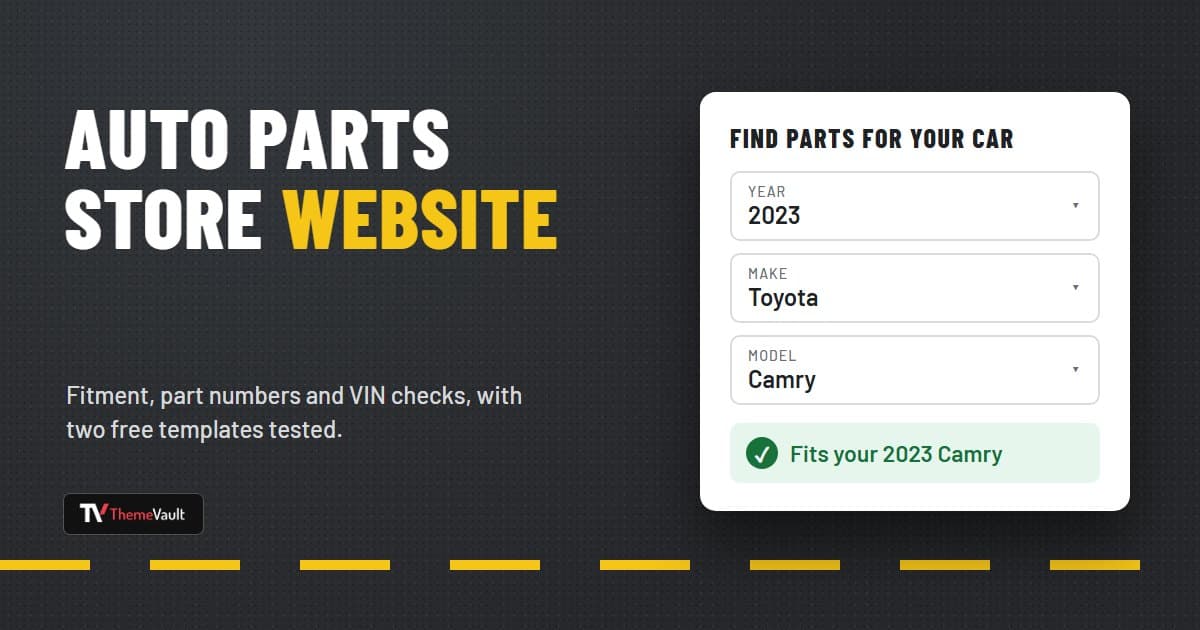
Car parts are one of the hardest things to sell online, and the reason isn’t price or shipping. It’s fit. A brake disc that looks right but belongs to the next model year is a return, a wasted afternoon for the customer and a refund for you. Most of what makes an auto parts website work, beyond a normal shop, is about answering one question before the customer pays: will this fit my car?
We have two free auto parts templates, Rawstuf and Carestorer, and we rebuilt both this autumn with that question in mind. I spent time on both live demos the way a customer would: saving a car, filtering parts, opening product pages and adding things to the cart. This post covers what an auto parts store website needs, where fitment data comes from, what the two templates do (with screenshots), and how to go from a template to a shop that takes orders.
What an auto parts site needs that other shops don’t
A clothing store needs sizes and good photos. A parts store needs a few extra things, and buyers notice quickly when they’re missing:
- A vehicle finder. Year, make and model, picked once, so the rest of the site can say what fits. Searching by registration or VIN is a bonus.
- A fit check on every product. “Fits your 2023 Camry” or “Not listed for your 2023 Camry”, right on the card and the product page.
- Part numbers you can search. Mechanics and confident DIYers often arrive with a number from the old part or a parts diagram. If your search box only understands “brake pads”, you lose them.
- Specifications, not just descriptions. Diameter, thickness, thread size, connector type. The spec table is what people compare.
- Trade or quantity pricing. Garages and fleet owners buy ten at a time and expect a better price for it.
- A clear returns page. Fitment mistakes still happen, and a plain returns policy is what makes a first-time buyer trust you.
- A human backup. A phone number or a “parts desk” note field, for the customer who isn’t sure.
Both of our templates are built around that list, in two quite different styles.
Rawstuf: a parts shop built around “My garage”
Rawstuf calls its 2.0 design “Fitment Counter”: a warm-white and charcoal look on Rawstuf’s red, with a technical, receipt-like feel. Its home page leads with the finder. You can type a licence plate, or pick a year, a make and a model.
I picked 2023. The make list offered BMW, Ford, Honda, Toyota and Volkswagen; Toyota gave me Camry, Corolla, Hilux and RAV4. I chose the Camry and pressed “Save to my garage”. From then on, the header read “My garage: 2023 Toyota Camry” on every page, and the rest of the shop started using it.
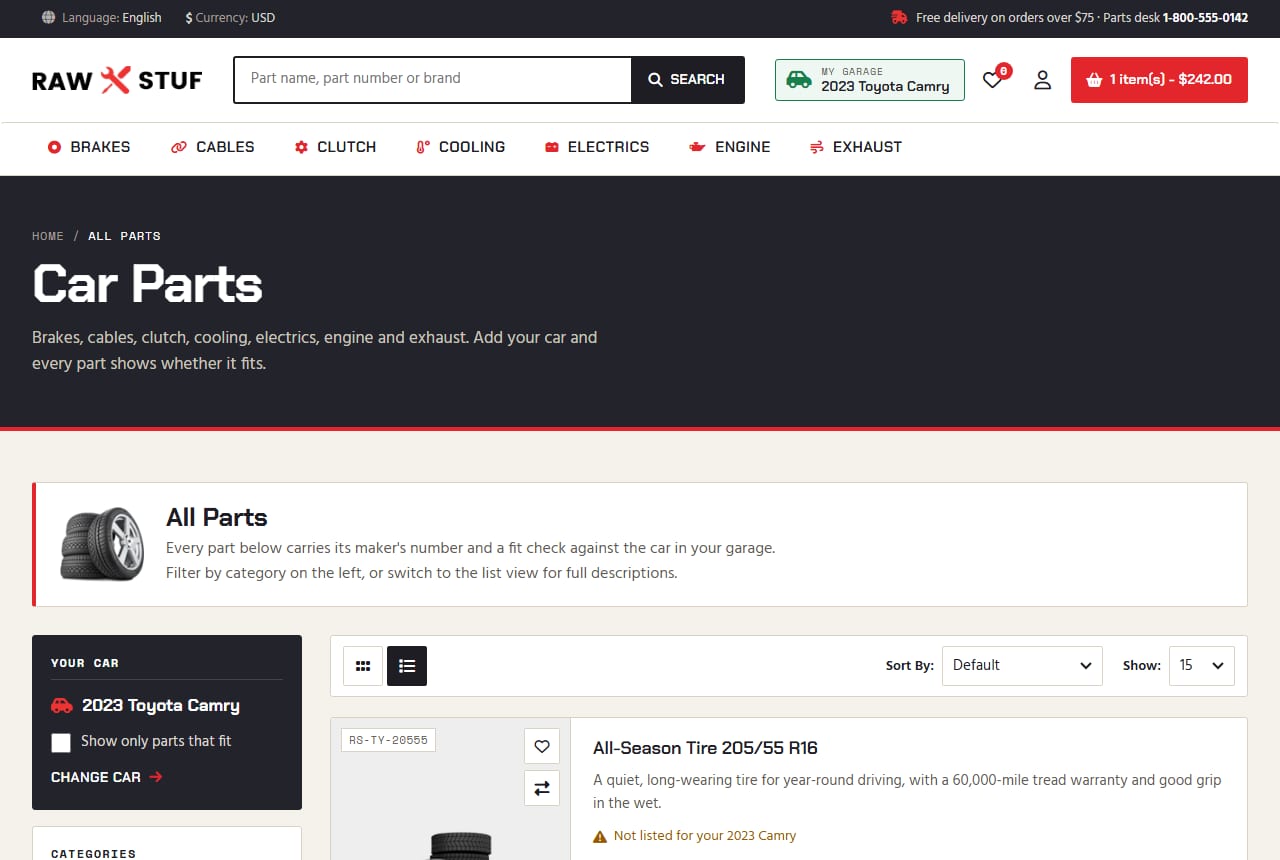
On the parts listing, a “Your car” box showed the Camry with a “Show only parts that fit” option and a “Change car” button. The page itself explains the idea in one line: “Every part below carries its maker’s number and a fit check against the car in your garage.” There are category filters with counts, sorting by price or name, grid and list views, and on phones the filters move into a panel.
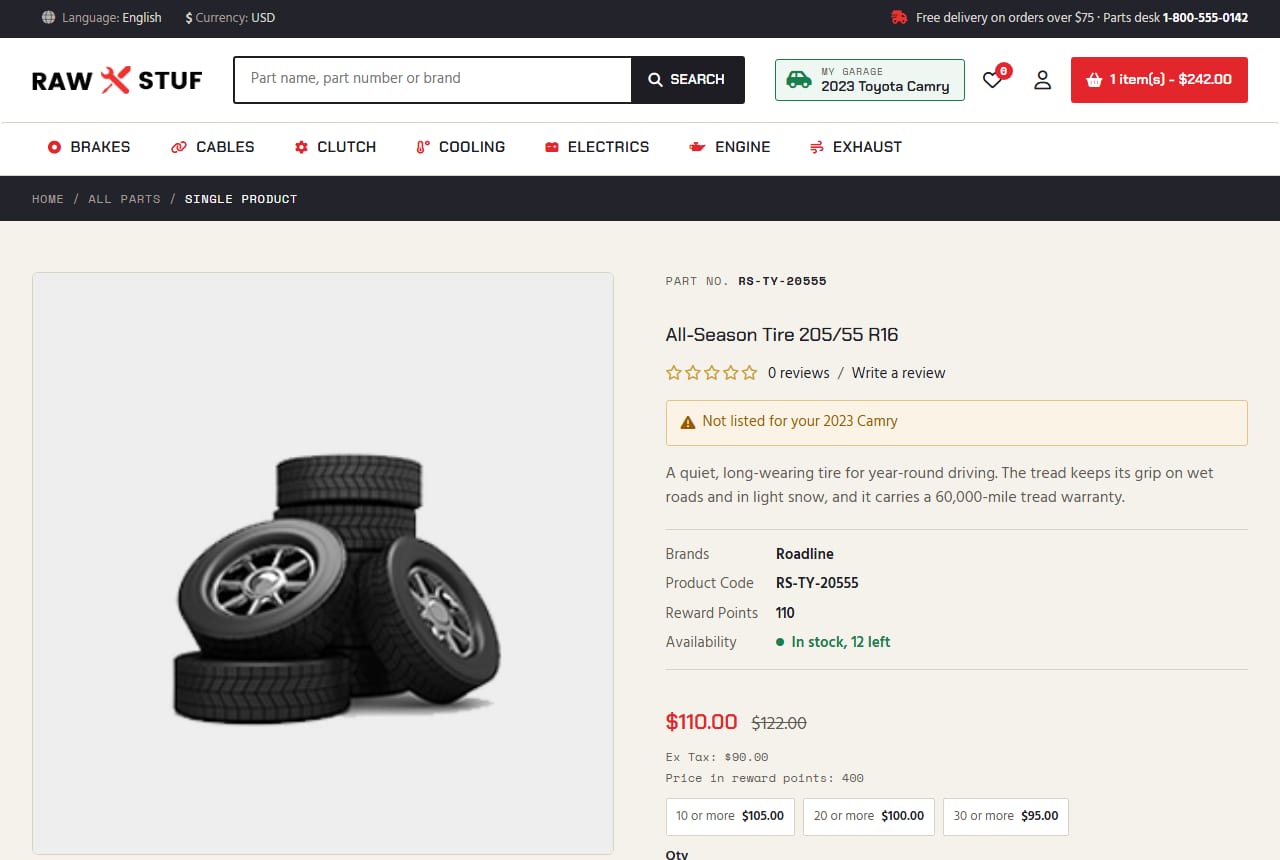
The product page is where the fit check pays off. I opened an all-season tyre (205/55 R16) and the first thing under the part number was a plain warning: “Not listed for your 2023 Camry”. Below that: stock (“In stock, 12 left”), the sale price with the ex-tax figure, and quantity prices for 10, 20 and 30 or more. That’s the trade-pricing line a garage looks for.
Version 2.0 also added the pages a real parts shop needs: checkout, an order confirmation, contact, about, and a delivery and returns page that includes privacy and terms. There are thirteen pages in all, plus six ready-made HTML emails (order confirmation, account welcome, password reset and others) for when you connect a system that sends them.
Carestorer: the parts counter with every option
Carestorer takes a more visual route. Its 2.0 design, “Exploded View”, opens with hero slides that draw a brake, suspension or electrics assembly apart along its axis, with a price tag on each part. The home page lists real parts with prices (a vented disc pair, a ceramic pad set, a caliper guide kit) and has a search box that takes a part name or number, filtered by system.
Where Carestorer shines is the product page. I opened a vented front brake disc pair and found the most complete parts listing either template offers:
- a product code (CS-BD2810), the sale price and the ex-tax price
- price breaks: $84 each for 10 or more, $79 for 20, $74 for 30
- an axle choice (front, rear, or front and rear, each with its own price)
- “add to the box” extras: a fitting kit, wear sensors, brake cleaner and copper grease
- a disc finish choice: plain, drilled, grooved, or drilled and grooved
- a Registration or VIN field, a note for the parts desk, a photo upload for the old part, a delivery date and a fitting appointment
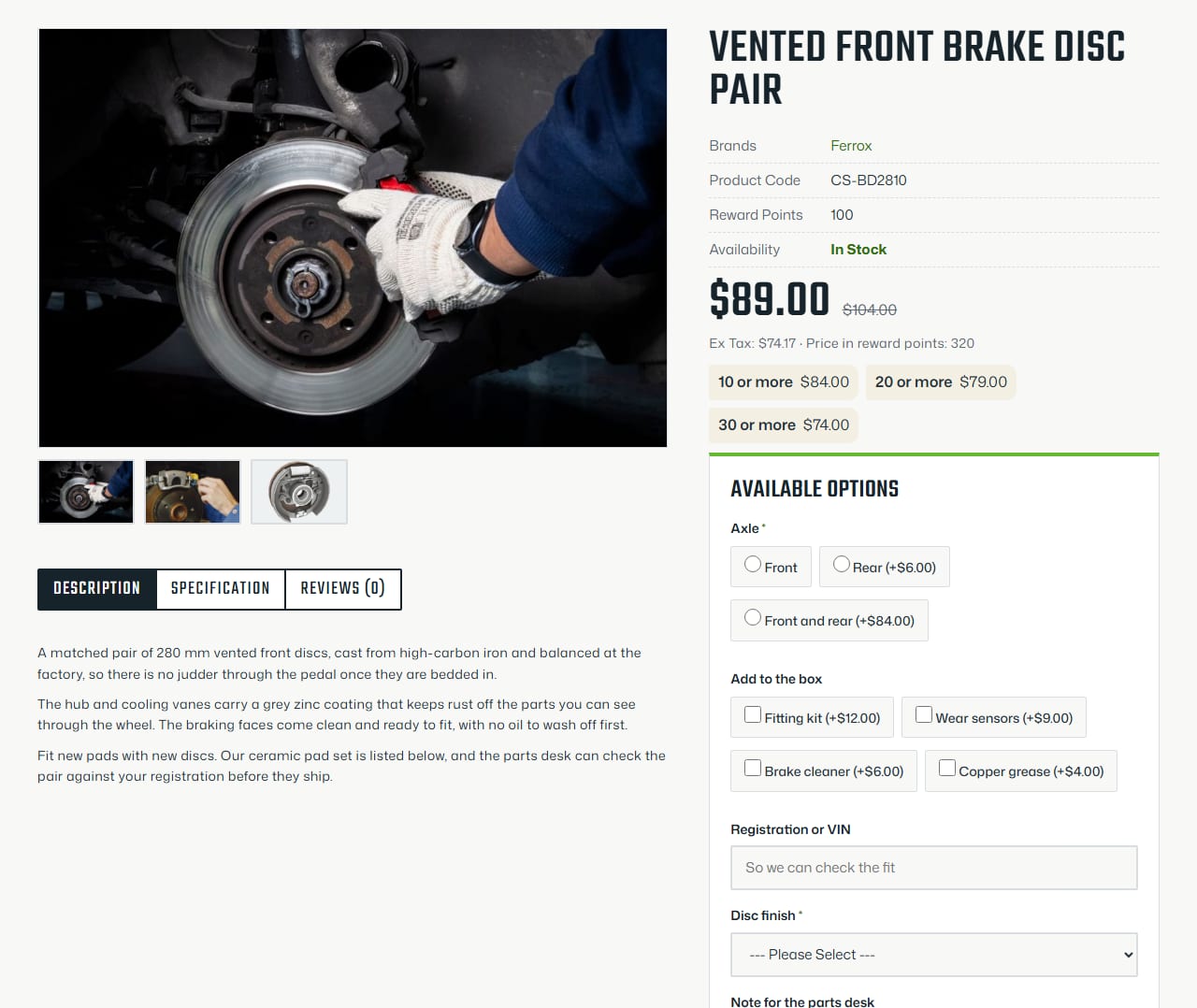
The description even says what a good parts shop would: the parts desk “can check the pair against your registration before they ship”. And it answers a question that causes real confusion with discs, “Sold as a pair: one unit is two discs, one for each side.”
One thing to do before going live, in both templates: the demo cart starts with an item already in it, so clear that out first.
Rawstuf or Carestorer?
If your customers mostly know their car but not their part, choose Rawstuf. The garage and the fit check do the work, and the listing can show only what fits. It suits a general parts shop selling to drivers.
If your customers know exactly what they want and care about options, choose Carestorer. Price breaks, finishes, extras and the VIN field suit a specialist (brakes, suspension, performance parts) or a shop that sells to garages.
Both are free, both are built on Bootstrap 5 with plain JavaScript, and you can see more on the autos and transportation templates page. Rawstuf is also on GitHub if you prefer to start from a repository.
Product pages that cut returns
Whichever template you pick, the words on each product page do more for fewer returns than any feature. A few habits from good parts catalogues:
Put the deciding facts in the title. “Brake disc” tells a buyer nothing. “Front brake disc pair, 280 mm, vented” tells them the axle, the size and the type before they click. People scan titles in a list; the title should answer “is this the right kind?” on its own.
Show both numbers. Use the maker’s part number, and if you know them, the original equipment numbers it replaces. A buyer holding the old part will search for the number stamped on it, and a mechanic will search for the number in the parts diagram. Carestorer and Rawstuf both have a part number on every card and product page, so the place is already there.
Say what’s in the box, and what isn’t. Is it one disc or a pair? Do the pads come with wear sensors, or are they extra? Are fitting bolts included? Carestorer’s “sold as a pair” line and its “add to the box” extras are a good model to copy.
Photograph the bits that decide fit. For electrical parts that means the connector; for filters, the thread and the seal; for brake parts, the mounting holes. A clean photo of the connector settles more questions than a paragraph of text.
Write a short fitting note. Not a full guide, just what matters: “Fit new pads with new discs”, “Bed in over the first 200 km”, “Needs a torque wrench”. It shows you know the part, and it heads off the “it squeals” returns.
Make search understand parts
Parts buyers search in their own words, and they don’t all use the same ones. A few things to plan for, whatever search you end up connecting:
- Part numbers with and without dashes and spaces (“CS-BD2810”, “CSBD2810”, “cs bd 2810”).
- Two spellings and two names for the same thing: tyre and tire, disc and rotor, silencer and muffler. If you sell in more than one country, you’ll get both.
- The system as well as the part: someone may search “brakes” and expect discs, pads, calipers and fluid, which is why Carestorer’s search box comes with a system dropdown.
On a small static site, the simplest fix is to write the alternative names into the product description or a hidden keywords line, so whatever search you add later can find them.
Where fitment data comes from
A finder is only as good as the list behind it. In Rawstuf, that list is refreshingly simple. The file js/vehicles.js holds every make, its models and the years each model was made:
window.RS_VEHICLES = {
  "Toyota": { "Camry": [2012, 2025], "Corolla": [2008, 2025] },
  "Honda":  { "Civic": [2012, 2025] }
};
Each product then says what it fits in one attribute, for example data-fits="Toyota/Corolla/2014-2019; Honda/Civic/2016-2021", or data-fits="all" for universal items such as tools. The template does the rest: the finder lists your makes, and every card says “Fits your…”, “Not listed for your…” or “Universal, fits any car”. A comment at the top of the file notes that a CMS can write it for you later, or set the list before the main script runs.
For a small shop with a few hundred parts, typing this in by hand is realistic, and it’s where I’d start. For a larger catalogue, the industry has its own standards. The Auto Care Association manages ACES (the Aftermarket Catalog Exchange Standard), which it describes as “the aftermarket industry data standard for the management and communication of product fitment data”, and PIES (the Product Information Exchange Standard) for the product information itself. ACES files are built on a vehicle database (the VCdb), and the association says that to create or receive ACES files “one must subscribe to one of the VCdb packages”. If you buy from larger makers or distributors, ask whether they can send fitment data in this format for the parts you stock before you type a single line.
From template to a shop that takes orders
Here’s the part every free shop template has in common: the cart and checkout work in the visitor’s browser, but no order or payment reaches you until you connect something. The saved car in Rawstuf, for example, lives in the browser’s own storage. That’s fine for remembering a car; it isn’t an order system.
We covered the options in detail in our post on free ecommerce website templates. In short:
- A few products: Stripe Payment Links or Razorpay’s Payment Button behind the Buy buttons. No code, but the template’s cart isn’t used.
- A real catalogue on a static site: Snipcart, which turns your Add to cart buttons into its own cart and checks each order’s prices against your pages.
- Stock and order management handled for you: embed an Ecwid store or Shopify’s Buy Button inside the design.
Parts shops have one more decision: the VIN or registration check. Carestorer’s form collects it, but someone has to read it. For a small shop, that someone can be you: take the order, check the part against the VIN before you ship, and call if it’s wrong. It’s slower than an automated lookup, and customers trust it more.
When a template isn’t enough
A static template with a hand-written vehicle list works well up to a point. Move to a platform when:
- you have thousands of parts and the fitment list changes every week
- you need stock to update across a shop counter and the website at once
- your suppliers send ACES or PIES files you want to import automatically
- trade customers need accounts with their own prices and order history
At that point you want WooCommerce, Shopify or a dedicated parts platform, with a fitment extension. The design doesn’t have to change: the look, the finder layout and the product page structure carry over, and our post on turning an HTML template into a WordPress theme explains what that move involves.
A launch checklist for a parts site
- Replace the vehicle list with the makes and models your customers actually drive, and the years you can support.
- Tag every product with what it fits, and mark tools and fluids as universal.
- Use real part numbers (the maker’s, and your own if you have them) so search works.
- Write the returns page with your real rules for parts that don’t fit. Both templates have a page for it.
- Add your own photos. The downloads ship with blurred placeholder photos, and photos of the actual part beat stock images for parts.
- Connect payments and forms, and change any confirmation text that promises an email you don’t send yet.
- Clear the demo cart item in either template.
- Keep or remove the footer credit. The templates are free for your own or a client’s site with the small ThemeVault credit, or you can remove it with a one-off fee on the template page.
Frequently asked questions
Is there a free auto parts website template with a year, make and model search?
Yes. Rawstuf has a year, make and model finder with an optional licence plate search, saves the car to “My garage” and shows on every product whether it fits.
How do I add my own vehicles to Rawstuf?
Edit js/vehicles.js: each make lists its models with a first and last year. Then give each product a data-fits list such as Toyota/Corolla/2014-2019, or all for universal items.
Can customers enter a VIN?
Carestorer’s product page has a Registration or VIN field. The template collects it; checking it against the part is up to you or a parts lookup service you connect.
Do these templates take payments?
Not on their own. Connect Stripe, Razorpay, Snipcart, Ecwid or Shopify’s Buy Button, as described in our ecommerce templates post.
What are ACES and PIES?
Data standards from the Auto Care Association: ACES describes which vehicles a part fits, and PIES describes the part itself. Larger catalogues use them to exchange fitment data with suppliers.
More from the blog
Free Ecommerce Website Templates (HTML): What the Cart Really Does, and How to Take Payments
We tested our free shop templates like a customer would: the cart, the checkout, the order page. Which one suits your store, and how to connect payments.
Read article →
Is Elementor Pro Worth It for a Small Business Website? (Honest 2026 Answer)
We build Elementor themes that work on free Elementor, so we know the line well: what Pro adds, what it costs, and when your site doesn't need it.
Read article →
College Website Project in HTML with Source Code (Free Template, Step by Step)
We turned our free Educatunify template into a college website step by step: the pages you need, the edits, the forms, GitHub Pages, the report and viva questions.
Read article →