
You have probably read that people now have an eight-second attention span, shorter than a goldfish. It is a great line, and it isn’t true. When the BBC looked into it, the figure was traced to a 2015 Microsoft Canada report, but it did not come from Microsoft’s own research, and there is no evidence that goldfish have particularly short attention spans either.
What research does tell us is more useful for anyone designing a website. People judge how a page looks almost instantly, and they decide whether to stay within the first several seconds. Here is what that means in practice, and the design details that keep people reading once they do stay.
What the research actually says
- About 50 milliseconds for a first impression. In a well-known 2006 study, Lindgaard and colleagues found that people form a judgment of a web page’s visual appeal in about a twentieth of a second, and that the judgment largely holds when they look longer.
- The first 10 seconds decide whether people stay. Nielsen Norman Group found that users often leave web pages in 10 to 20 seconds, but pages with a clear value proposition can hold attention for much longer.
- People scan before they read. Eye-tracking studies, including Nielsen Norman Group’s work on the F-shaped pattern, show that visitors skim headings and the start of lines first, and only read in full once something catches them.
So there are really three jobs: look trustworthy at a glance, say what the page offers within seconds, and make the rest easy to scan.
The first glance: look like you know what you are doing
Nobody reads anything in 50 milliseconds. What they take in is the overall impression: is it tidy, is it readable, does it look current, does the photo look real? The fixes are simple and visual:
- One strong photo or illustration, not a collage.
- Plenty of space around the main headline.
- Two fonts at most and a small set of colors. (My post on the best fonts for websites has pairings that work.)
- Nothing moving or popping up in the first moment.
The first ten seconds: what it is and what to do next
Once the page passes the glance test, visitors look for two answers: is this what I was looking for, and what do I do here? The first screen of our ClassicRestro restaurant template answers both without scrolling:
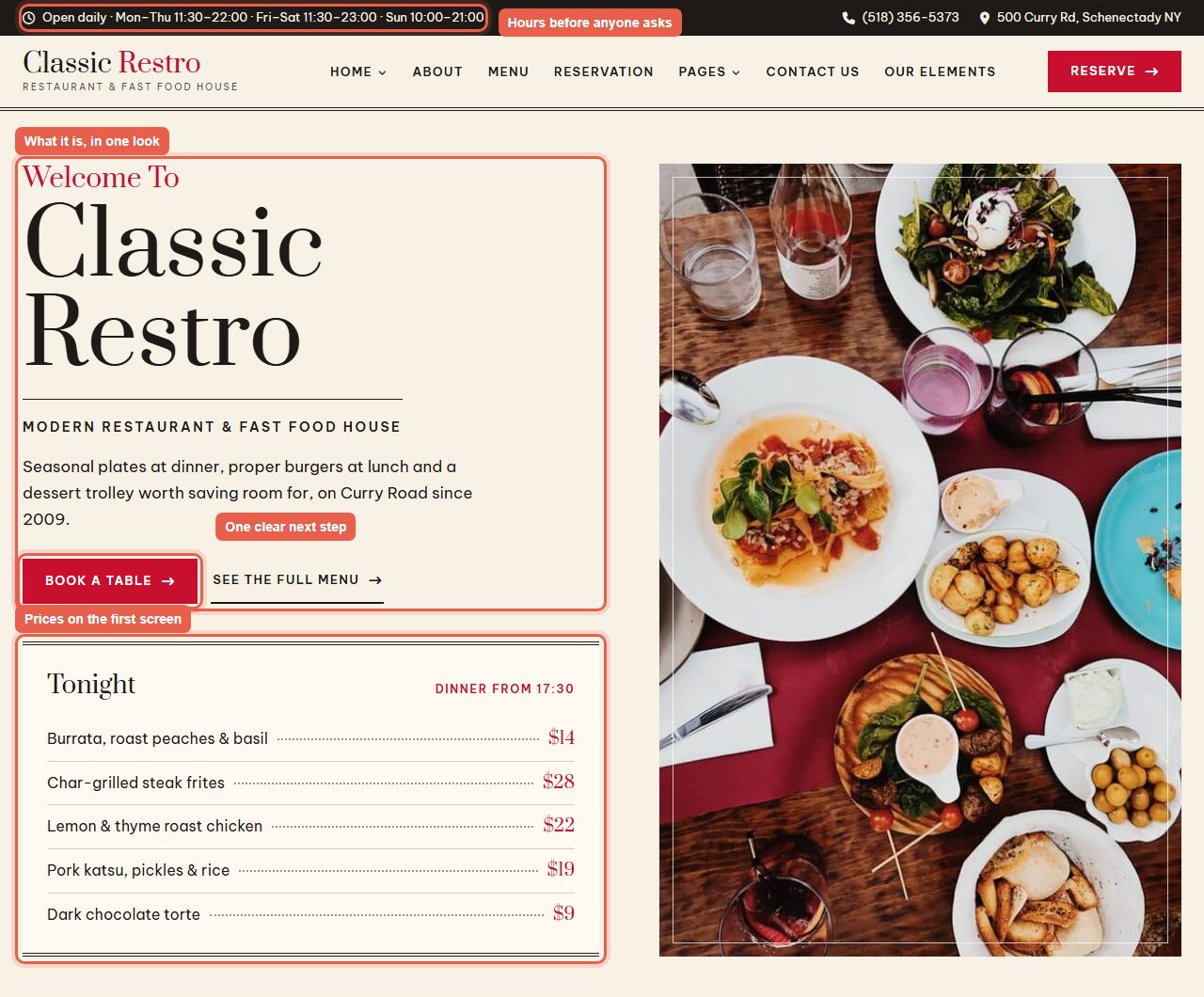
- What it is, in one look: the name, a one-line description (“Modern restaurant & fast food house”) and a sentence on what makes it different.
- One clear next step: “Book a table” is the obvious button; the menu link is there, but quieter.
- Prices on the first screen: tonight’s dishes with their prices answer the question most visitors came with.
- Hours before anyone asks: opening times sit in the top bar on every page.
The same four things work for any business: say what you do and for whom, show one main action, answer the most common question, and put the practical details where nobody has to look for them. My post on web design inspiration shows six more first-screen ideas from our templates.
Write for people who scan
- Make headings carry the message. Someone reading only your headings should understand the page.
- Put the important words first in headings, paragraphs and list items. Scanners read the start of lines.
- Keep paragraphs short: two to four sentences. A wall of text on a phone is a reason to leave.
- Use lists for anything that is a list: services, what is included, steps.
- Bold sparingly, for the one phrase in a section you most want noticed.
Small interface details that keep people going
Attention is also lost to friction: a link that is hard to tap, a form field without a label, gray text on a gray background. These details are small, and each one costs you visitors:
- Big enough to tap. The accessibility guidelines (WCAG 2.2) set a minimum target size of 24 by 24 pixels; for main buttons on a phone, aim well above that. Make whole cards clickable, not just the small “read more” text inside them.
- Labels above form fields, not only placeholder text that disappears as soon as someone starts typing.
- Enough contrast. Body text needs a contrast ratio of at least 4.5 to 1 against its background. Light gray text looks elegant in a mockup and is hard to read outdoors on a phone.
- Links that look like links: a different color and, in body text, an underline.
- A visible focus outline for people using a keyboard, so they never lose their place.
What drives people away
- A slow first screen. Compress images, load the ones lower down lazily, and keep fonts to a few files.
- Pop-ups on arrival. Asking for an email before someone has read a word rarely works; ask after they have seen something useful.
- Auto-playing sliders and videos. Movement grabs the eye, but it pulls it away from your message. If you use a slider, make the first slide do the whole job.
- Placeholder or vague text. “Welcome to our website” tells nobody anything; one specific sentence about what you do beats a paragraph of general claims.
Test it in five seconds
Show your first screen to someone who doesn’t know the business for five seconds, then hide it and ask two questions: what is this site for, and what would you click? If they can’t answer both, change the headline or the main button and try again with someone else. It is the cheapest usability test there is, and it works just as well on a sketch; my post on why wireframing is important shows how to sketch the page first.
FAQ
Is the average attention span really eight seconds?
No. The figure, often compared with a goldfish, was traced to a 2015 Microsoft Canada report but did not come from Microsoft’s own research, and there is no good evidence behind it. What is well supported is that people judge a page’s look very quickly and decide whether to stay within the first several seconds.
How long do people stay on a website?
Many visitors leave within 10 to 20 seconds, according to Nielsen Norman Group’s analysis, but pages that make their value clear quickly can hold people much longer. The first ten seconds matter most.
How can I make visitors stay longer on my website?
Say what you offer and for whom on the first screen, show one clear next step, answer the most common question (often price or opening hours) up front, and make the rest of the page easy to scan with clear headings and short paragraphs.
Do sliders and animations help hold attention?
Usually not. Movement catches the eye but distracts from the message, and many visitors never see the later slides. A single strong first screen almost always works better.
More from the blog
How to Build a Portfolio Website That Gets You Hired (2026)
Recruiters give your portfolio about a minute. I tested our portfolio templates the way a hiring manager would: opened the projects, pressed the CV buttons, sent the contact forms. Here is what matter...
Read article →
Free Art Gallery Website Templates (2026): 6 Responsive Picks
Six free, responsive art gallery and photography templates you can download today. I checked each live demo rather than the feature lists — here is which ones have a working lightbox, which use masonr...
Read article →
Landing Page Design: 9 Rules That Get More Sign-ups (2026)
Nine landing page design rules, shown on two real landing templates, plus how to test changes and when you need a landing page instead of a home page.
Read article →