
Wireframing is important because it lets you decide what goes on a page, in what order, and what you want people to do there, before anyone spends time on colors, photos or code. Moving a gray box takes a minute. Moving a finished, coded section takes an afternoon, and usually breaks something else on the way.
I sketch a wireframe for every template before I design it, even the small ones. Below are the reasons I keep doing it, a real example from one of our hotel templates, and the way I go about it.
What a wireframe is (and isn’t)
A wireframe is a plain layout of a page: boxes for photos, lines for text, outlines for buttons and form fields. No brand colors, no fonts, no real images. It answers three questions: what is on the page, where does each thing sit, and how much space does it get.
It is easy to mix it up with the other stages, so here is how I separate them:
- Wireframe: structure only. Gray boxes, rough text, the main buttons.
- Mockup: what the page will look like. Colors, type, photos, but it doesn’t do anything when you click.
- Prototype: something you can click through, so you can test how people move between pages.
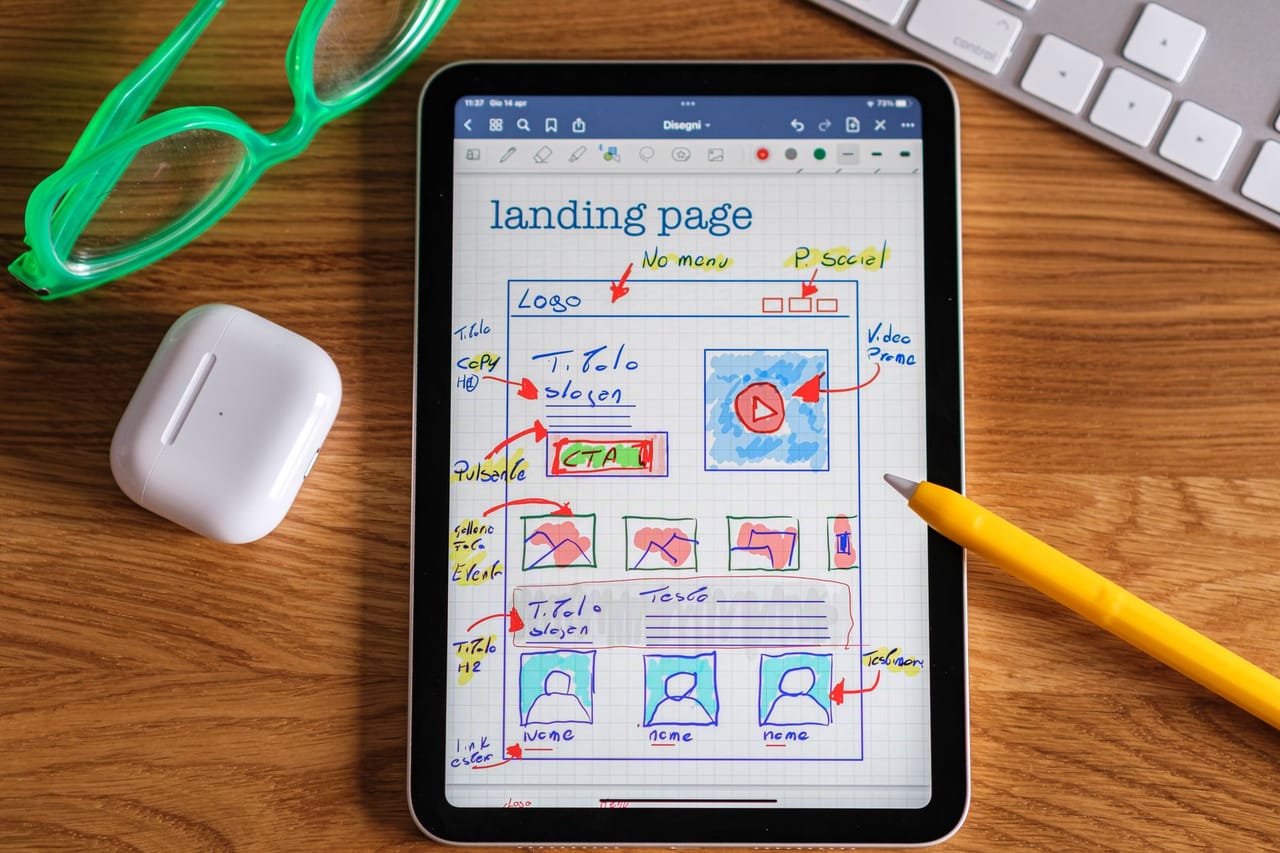
A wireframe can be a pencil sketch on paper or a tidy gray layout in a design tool. How neat it is matters much less than what it settles.
Why wireframing is important: 9 reasons
1. It settles what people see first
Every page has one or two things that matter more than the rest. On a wireframe there is nothing to hide behind, so you can see straight away whether the headline, the price or the main button is getting the space it deserves, or whether a slider and three badges are fighting it for attention.
2. It puts the main action where it gets noticed
Ask what the visitor should do on this page (book, buy, call, sign up) and draw that button first. Then check the wireframe: is it on the first screen? Does it show up again after the part where people make up their minds? If you can’t point to it in a gray layout, it will get lost once the photos go in.
3. Changes are cheap at this stage
This is the big one. Swapping two sections on a sketch costs nothing. After the design is signed off it means new artwork, and after the build it means new code, new testing and often a new round of approval. Most of the expensive changes I’ve seen on projects were really structure questions that nobody asked early enough.
4. Feedback is about the right things
Show someone a finished design and they will talk about the blue, the font or the photo of the building. Show them a wireframe and they talk about the content: “where are the prices?”, “we never mention parking”, “this section can go”. Those are the comments you need first, and a wireframe gets them without the distraction.
5. It shows what content is missing
Drawing a box for “room photos” or “three customer reviews” makes you ask whether you actually have them. It’s much better to find out in week one that there are no good photos of the restaurant than to find out the day before launch.
6. It plans the phone layout too
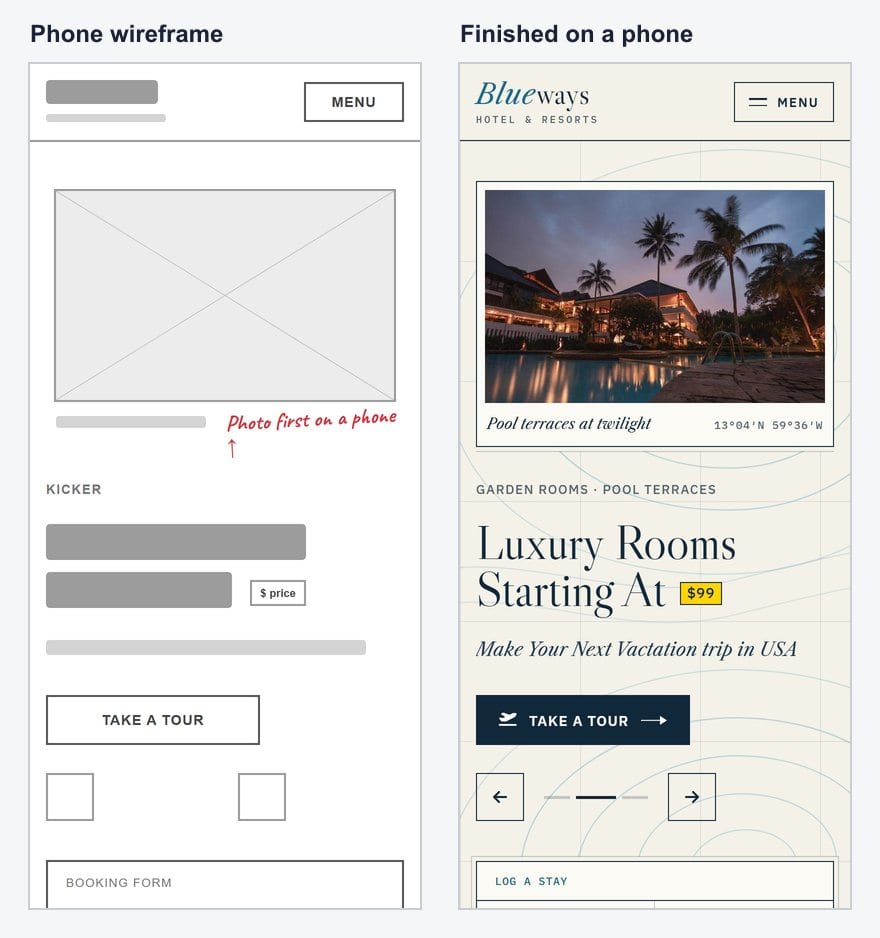
Most visitors will see the page on a phone, where everything stacks into one column. A small phone wireframe next to the desktop one forces the useful questions: what comes first when there is no sidebar, where the menu goes, and how far someone has to scroll to reach the button that matters.
7. Navigation and page count become clear
Once a few key pages are wireframed, you can see which pages the site really needs, what goes in the menu and which links each page must have. It is the point where “we’ll need a page for that” turns into a list, and the list stops growing by surprise halfway through the build.
8. Developers get a clear brief
A wireframe tells whoever builds the site what each section has to do: this form has four fields, this list shows six items, this block repeats on every page. That makes estimates more honest and saves a lot of back-and-forth messages later.
9. You can test it before it is built
You don’t need a lab. Show the wireframe to two or three people who fit your audience and ask them to point at where they would click to do the main task. If they hesitate or point at the wrong thing, you fix a sketch, not a website.
A real example: wireframe to finished page
To show what this looks like, I drew a wireframe of the top of our Blueways hotel template and put it next to the finished home page. The red notes are the decisions the wireframe is there to settle.
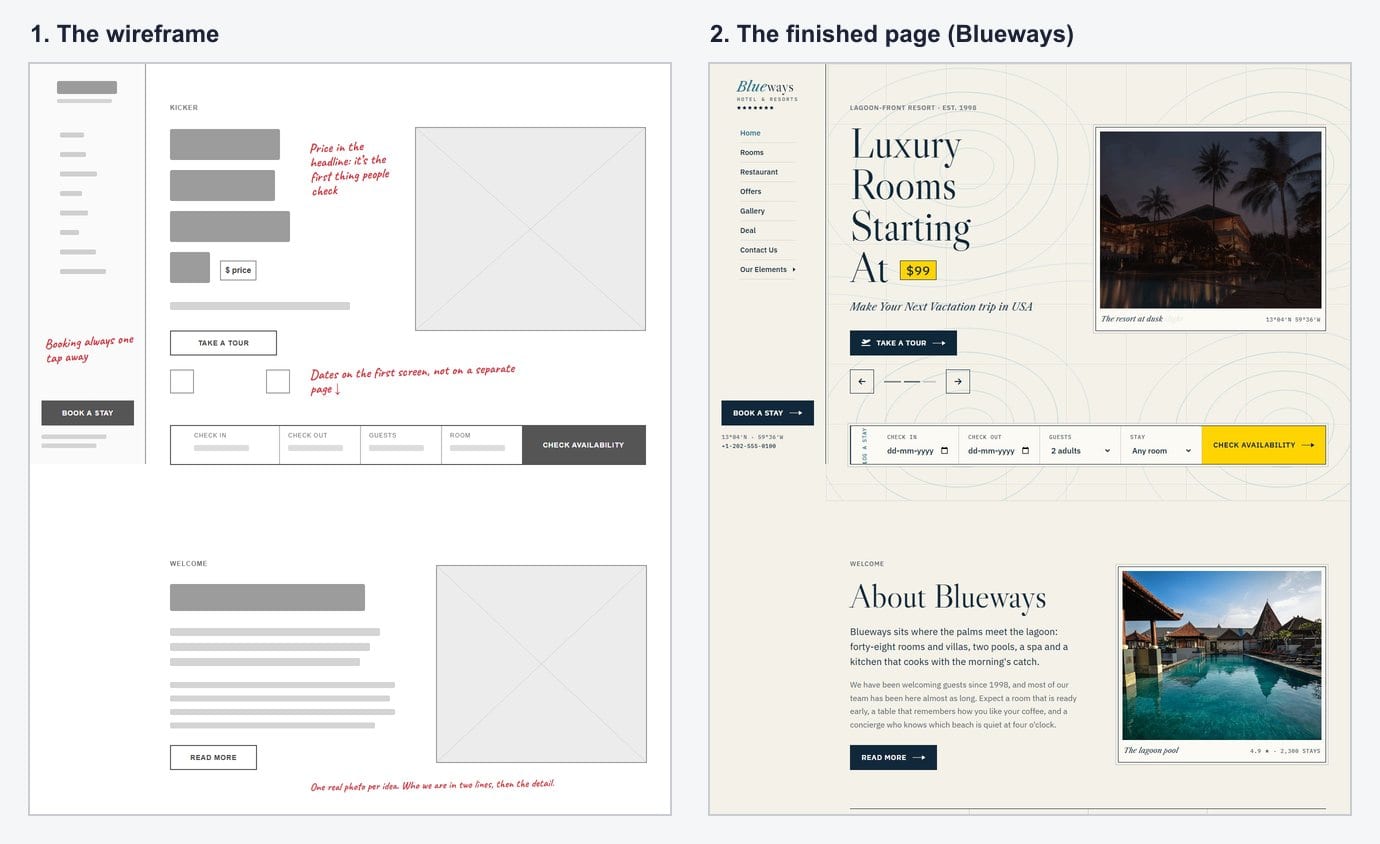
Look at what the wireframe already decides. The starting price sits inside the headline, because a price is the first thing people look for on a hotel site. The date picker (check in, check out, guests, room) is on the first screen instead of a separate booking page. “Book a stay” stays in the side menu, so it is always one click away. The colors, the serif type and the photos all came later, and none of them changed those choices.
The phone version is a separate decision, not a squeezed copy of the desktop:
How I wireframe a page
- List the content first. Before drawing anything I write down what the page has to hold: the message, the proof, the main action, the details people ask about. If it isn’t on the list, it doesn’t get a box.
- Sketch on paper. Three or four quick versions with a pen, not one careful one. The second or third is usually better than the first.
- Draw the phone version next to it. Same content, one column. Decide the order again rather than assuming it.
- Mark the main action. I shade the most important button so it stands out from everything else on the sketch.
- Use real headlines where you can. Placeholder text hides problems. A real headline tells you whether the space is big enough.
- Make a clean version and show it to someone. A gray layout in whatever design tool you like, then the “where would you click?” test from reason 9.
For tools, paper and a pen are honestly enough for most pages. When I need a clean version to share, any design tool with simple shapes will do: Figma, Penpot and Balsamiq are all popular, and Balsamiq is built only for wireframes, so it is hard to get distracted by styling.
Do you still need a wireframe if you start from a template?
A lighter one, yes. A template gives you a finished layout, so you aren’t inventing the structure, but it was made for a typical business, not for yours. Before you start editing, take your content list and walk through the template’s sections: which ones you keep, which you remove, which need moving up, and what is missing. Ten minutes with a printout and a pen saves you from filling in sections you never needed.
If you are looking for a starting point, every design in our website templates collection has a live demo, so you can scroll the real structure and sketch your changes over it before you download anything.
FAQ
What is the main purpose of a wireframe?
To agree on the structure of a page before design and development start: what content it holds, the order it comes in, and where the main action sits. Everything later builds on those decisions.
What is the difference between a wireframe and a mockup?
A wireframe shows structure with plain boxes and lines. A mockup shows the finished look, with colors, fonts and real images. You wireframe first, then design the mockup on top of the agreed structure.
How long should wireframing take?
For a single page, a paper sketch takes a few minutes and a clean version an hour or two. For a small website, wireframing the home page and two or three key pages is usually enough; the rest follow the same patterns.
Does a small website need a wireframe?
Yes, but it can be a sketch on paper. Small sites have fewer pages, so each page has to work harder, and a quick wireframe is the easiest way to make sure the important things are on it.
Should a wireframe include real text?
Use real headlines and button labels where you can, and placeholder lines for longer paragraphs. Real headlines show whether the space works; long lorem ipsum hides that.
More from the blog

How to Build a Portfolio Website That Gets You Hired (2026)
Recruiters give your portfolio about a minute. I tested our portfolio templates the way a hiring manager would: opened the projects, pressed the CV buttons, sent the contact forms. Here is what matter...
Read article →
Restaurant Website Templates With Menus, Table Booking and Online Ordering (2026)
Seven free restaurant and café templates, checked for what their menus, booking forms and order pages really do — and where the free HTML stops and a WordPress or Next.js version with a real admin pan...
Read article →
Free Art Gallery Website Templates (2026): 6 Responsive Picks
Six free, responsive art gallery and photography templates you can download today. I checked each live demo rather than the feature lists — here is which ones have a working lightbox, which use masonr...
Read article →