
A 404 page is what visitors see when they ask for a page that doesn’t exist: a mistyped address, an old link, a page you removed. Every site has them, and most people land on one at some point. A good 404 page doesn’t apologize at length; it tells people what happened in one line and gives them a quick way to carry on.
Below are the design rules I follow, the technical setup that a lot of guides skip (it matters more than the artwork), and our eight free 404 page designs.
What a good 404 page does
- Says what happened, plainly. “We can’t find that page” beats “Error 404: resource not found”. The number can be big and decorative; the explanation should be human.
- Still looks like your site. Keep the logo, colors and, ideally, the main menu, so visitors know they haven’t left.
- Offers a way back. A button to the home page at the very least. Better: a search box, and links to the two or three pages people most often want.
- Gives people someone to tell. A contact link helps you hear about broken links you didn’t know about.
- Stays light. A bit of humor is fine if it suits your brand, but it should never get in the way of the way out.
- Loads fast. Someone who has just hit a dead end won’t wait for a heavy animation.
The technical part: get this right first
Return a real 404 status
The page should look friendly, but the server must still answer with the status code 404 (or 410 for something removed on purpose). If your error page returns 200 OK, search engines treat it as a real page, and Google reports it as a “soft 404”. You can check the status in your browser’s developer tools (Network tab) or from a terminal:
curl -I https://www.yoursite.com/this-page-does-not-existDon’t redirect every missing page to the home page
It is tempting to send all dead links to the home page, but it confuses visitors (they land somewhere they didn’t ask for, with no explanation) and Google tends to treat those redirects as soft 404s anyway. Redirect a missing page only when there is a clear replacement, such as a page you renamed or moved; use a 301 redirect for that, and let everything else show the 404 page.
Use root-relative paths in the 404 page
Your 404 page can be shown at any address, including deep ones like /blog/2019/old-post/. If it loads its stylesheet as css/style.css, the browser looks for /blog/2019/old-post/css/style.css, finds nothing, and shows an unstyled page. Start every path in the 404 page with a slash (/css/style.css, /images/logo.png) so it works from anywhere.
Point your server at the page
On Apache hosting (most shared hosts and cPanel), add one line to the .htaccess file in your site’s root folder:
ErrorDocument 404 /404.htmlOn Nginx, inside your server block:
error_page 404 /404.html;On static hosts such as Netlify, GitHub Pages and Cloudflare Pages, a file named 404.html in the root of your site is used automatically, with the correct status. Many hosting control panels also have an “Error pages” setting that does the same thing.
Find and fix the broken links
Google Search Console lists the missing pages it has found under Pages, as “Not found (404)”. Look through it every month or so: if a missing page used to exist and has a natural replacement, add a 301 redirect; if a link on your own site points to it, fix the link.
8 free 404 page designs
We rebuilt all eight of our 404 designs this year, and each is now a small error-page kit rather than a single page. Every design gives the visitor a working way home (in the original versions, some of those buttons went nowhere), and most add a contact page so “Contact us” actually leads somewhere.
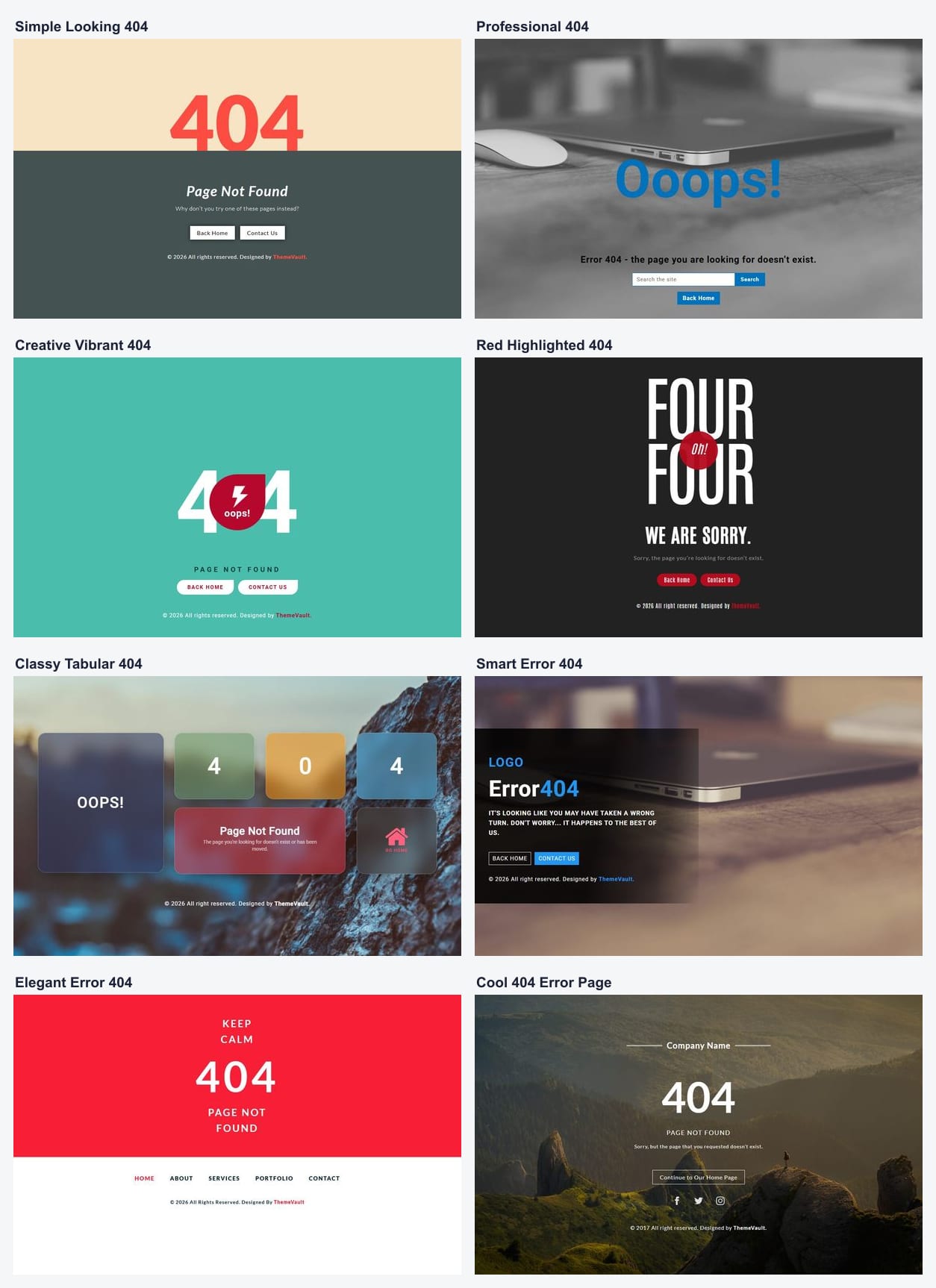
- Simple Looking 404: calm and clear, with Back Home and Contact Us buttons. A safe choice for almost any site.
- Professional 404: the only one with a search box on the 404 page itself, which is the most useful single thing a 404 page can offer.
- Creative Vibrant 404: playful, with the middle zero turned into a badge.
- Red Highlighted 404: bold condensed type on a dark background.
- Classy Tabular 404: frosted tiles over a full-screen photo.
- Smart Error 404: a panel over a photo, with room for your logo.
- Elegant Error 404 Page: a strong color band with your main site links underneath.
- Cool 404 Error Page: a landscape photo, a home button and your social links.
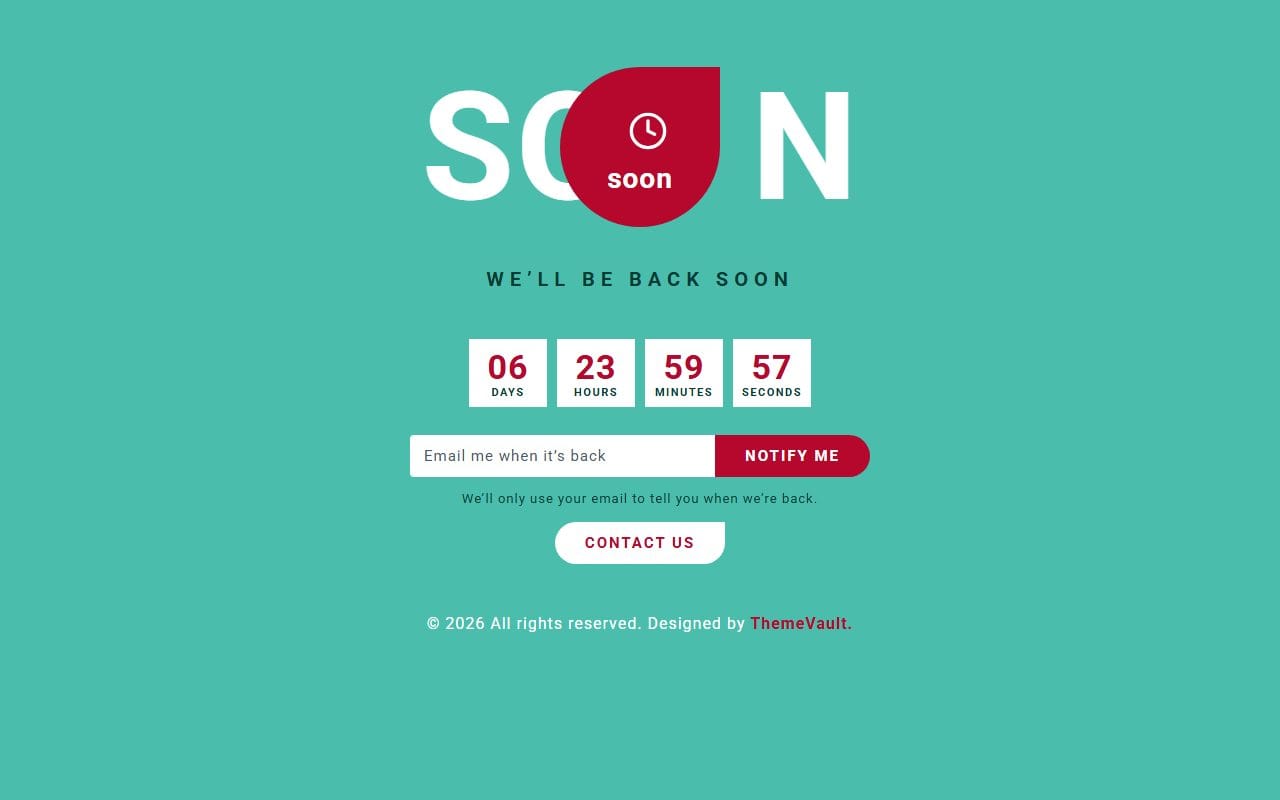
Each kit also includes the pages you need when things go wrong in other ways: a matching 500 page for server errors, a maintenance page with a countdown and a “notify me” form, and an offline page that notices when the connection comes back. Most kits also come with ready-to-send emails, such as the notice you send before planned maintenance.
They are free, like all our HTML templates. You can see them together under 404 page templates, and the rest of our small, add-to-any-site pieces (login forms, coming soon pages, countdowns) are in site elements. Before you upload one, remember the root-relative paths above.
FAQ
Are 404 errors bad for SEO?
No. Every site has missing pages, and a real 404 is the correct answer for them; Google says so itself. What causes problems is returning 200 for missing pages (soft 404s) and leaving your own internal links broken.
Should I redirect 404 pages to my home page?
Not all of them. Redirect a missing page with a 301 only when there is a clear replacement. For everything else, show a helpful 404 page with the right status code.
What is the difference between a 404 and a 410?
Both mean the page isn’t there. A 410 (“Gone”) says it was removed on purpose and won’t come back, which can make search engines drop it a little sooner. For most sites, a 404 is fine.
What should a 404 page include?
A short, plain explanation, your normal branding, a button back to the home page, and ideally a search box, links to popular pages and a way to contact you.
More from the blog

How to Build a Portfolio Website That Gets You Hired (2026)
Recruiters give your portfolio about a minute. I tested our portfolio templates the way a hiring manager would: opened the projects, pressed the CV buttons, sent the contact forms. Here is what matter...
Read article →
Free Art Gallery Website Templates (2026): 6 Responsive Picks
Six free, responsive art gallery and photography templates you can download today. I checked each live demo rather than the feature lists — here is which ones have a working lightbox, which use masonr...
Read article →
Landing Page Design: 9 Rules That Get More Sign-ups (2026)
Nine landing page design rules, shown on two real landing templates, plus how to test changes and when you need a landing page instead of a home page.
Read article →